Teamwork is always synergistic and empowering, but it also means that sometimes more than one person manages the same topic or section, and we may not even remember what actions we took, which is why it’s so important to be able to track what was managed.
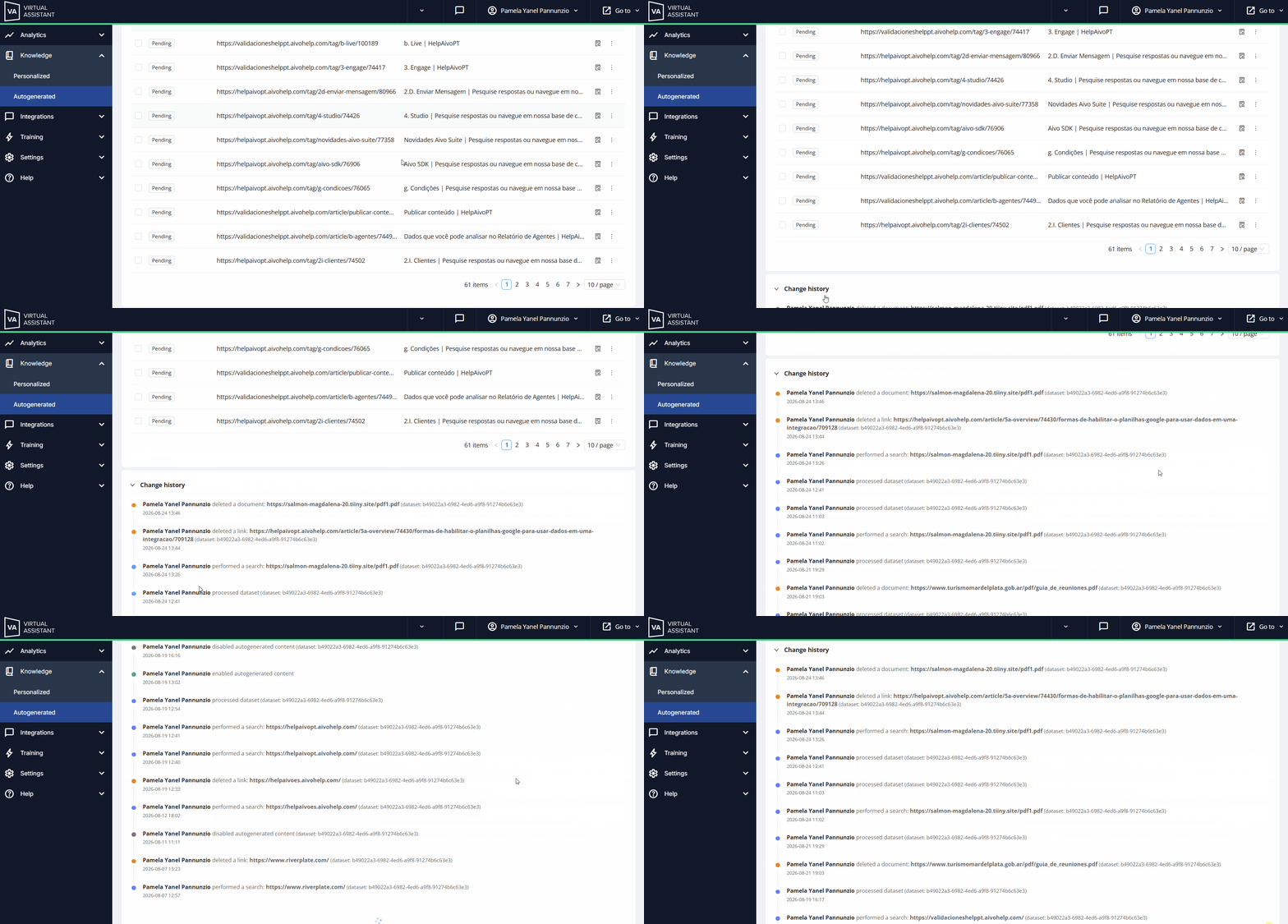
 For this reason, the Autogenerated section includes a change history that lets you view the modifications made by users.
 At the bottom of the section is the Change History, where you can see:
- The user who made the change;
- The modification made;
- The date it was made: day/month/year.
- The exact time it was made: hour and minutes.

 The history enables rapid identification of changes that may affect the virtual assistant’s knowledge while also supporting efficient, collaborative content management.
- It logs activations/deactivations, searches, process executions, deletions, and new datasets, sorted by modification date.
- It provides customers in regulated industries with an audit trail for regulatory compliance and streamlines investigations.
This gives you greater control over updates and allows you to verify the impact of changes on the content.
 The Change history is read-only and shows changes made since August 2026. Changes made before that time may not be available. The Change history is read-only and shows changes made since August 2026. Changes made before that time may not be available. |
 In the following example, you can see how the changes are displayed, along with the user responsible and the date of each change.