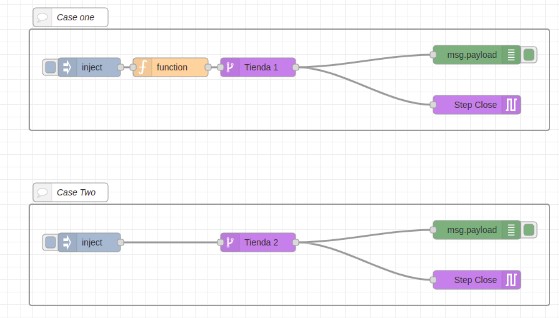
This add-on allows you to condition the AgentBot session by selecting the name of the condition to apply.
To test it, you must first have conditions created in your bot  To create conditions request it through a service request.
Once the flow is imported, we must configure the parameters. Otherwise, they will keep a default value.
First, you will need to configure the session ID. The variable {{sessionID}} refers to the conversation ID that is obtained before the plugin output and can be found in the variable: "msg.payload.agentbot_user.id" to capture and store this data inside a msg, so you can use this same parameter later inside the flow.
Shortly after, you must choose the bot to be used within the bot selection. Only the bots you have access to on the platform will appear in this field.
Finally, you must use the conditions, select and choose the desired option.
To use it, connect the node to the section of the flow where you want the conditioning to take place, and when you go through this path the session will be conditioned.
Remember that you must configure the previously detailed parameters, marked in bold, and if the operation is correct, you can see through a debug node that the msg object will have the property "Condition" with the name and type of the defined condition.
Download the flow by clicking here.