If you have a Facebook channel, you have the possibility to create URLs that generate actions in Facebook Messenger, such as referring to human chat, displaying a form or any other type of add-on.
You can place these URLs wherever you want, for example, in Facebook Wall or Email Marketing campaigns, your users will automatically be redirected to Facebook Messenger when they click on them, where the response of the chosen intention will be displayed.
Important: please note that you must have the "Start" button configured in your welcome message for that channel. Learn more in the following article.
The URL can be accessed by both unique (new) users and recurring users, i.e. those who have already interacted with the Virtual Assistant on Facebook.
- Unique users: once you click on the link you will be redirected to Facebook Messenger, clicking on "Start" will automatically show the response of the intention you have selected for that URL.
- Recurring users: clicking on the link will automatically display the response to the selected intent.
To configure it:
1. In the Platform Knowledge section, you must first create an intention that you will include in your URL, the answer can have any complement available in the platform.
Important: in the URL the intention must be loaded without blank spaces, we recommend using short words so that the URL is not too long.
2. The URL you build to be derived must have the following structure: http://m.me/EXTERNALAPPID?ref=INTENCION
EXTERNALAPPID: replaced with the Facebook page ID
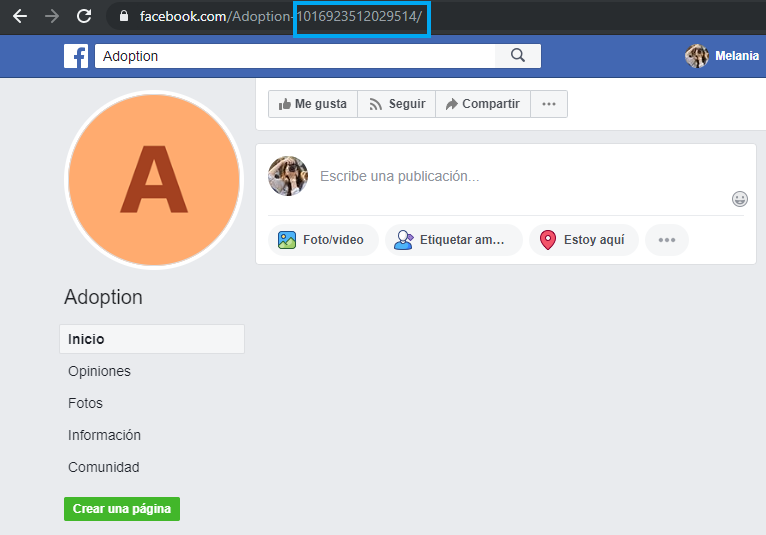
INTENT: it is replaced with the one previously loaded in the platform.
3. Share the link by any means you wish.
Important: any changes made to the intent will affect the link's performance.