You can integrate Engage with Meta's MM Lite API to send One-Time and Recurrent message campaigns using Marketing message templates via WhatsApp.
This integration offers greater flexibility and control over deliveries, while also optimizing costs for high-volume promotional campaigns.
 Main requirements
- Connect the WhatsApp Business account you use for sending from Engage to the MM Lite API.
- Comply with WhatsApp Business Messaging Policies and the legal, vertical, and content restrictions in force in your country.
- WABA must be active and:
- Not restricted from messaging due to any violations
- Not be a WhatsApp Business app account (also known as a coexistence WABA).
- Not be an “on behalf of” (OBO) account.
- Not be in a sanctioned region (neither the tax country nor the country of the owning company).
- It is essential that you or someone on your team has access to the Business Manager linked to the line to be connected.
 MM Lite will continuously update vertical eligibility and policies to comply with various policies and regulations internationally, so these requirements may change.
 Connecting to MM Lite
- Your user must be an administrator in Engage.
- Engage automatically validates whether the account meets the eligibility requirements.
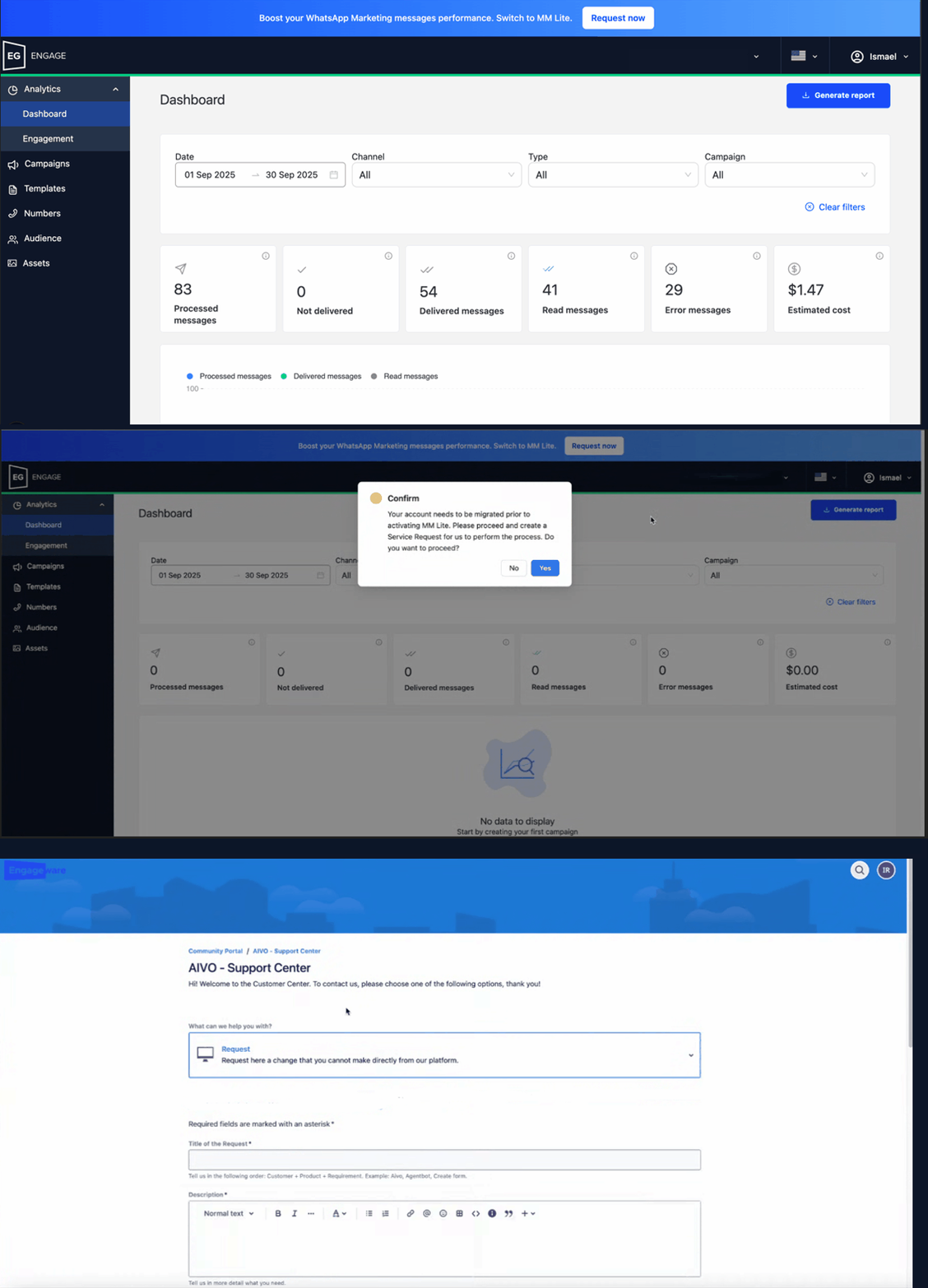
A. If it does not meet the requirements,
- When you log in to Engage, you will see the option
 Switch to MM Lite. Request now.
 - When clicked, you will be redirected to the support portal to create a Service Request and request migration.
B. If it does:
- When you log in to Engage, you will see the option Switch to MM Lite. Activate now.
- When you click, a box will pop up to confirm that you understand the migration will apply to all WhatsApp Accounts linked to the main Business Portfolio ID. To continue, select “Yes.”
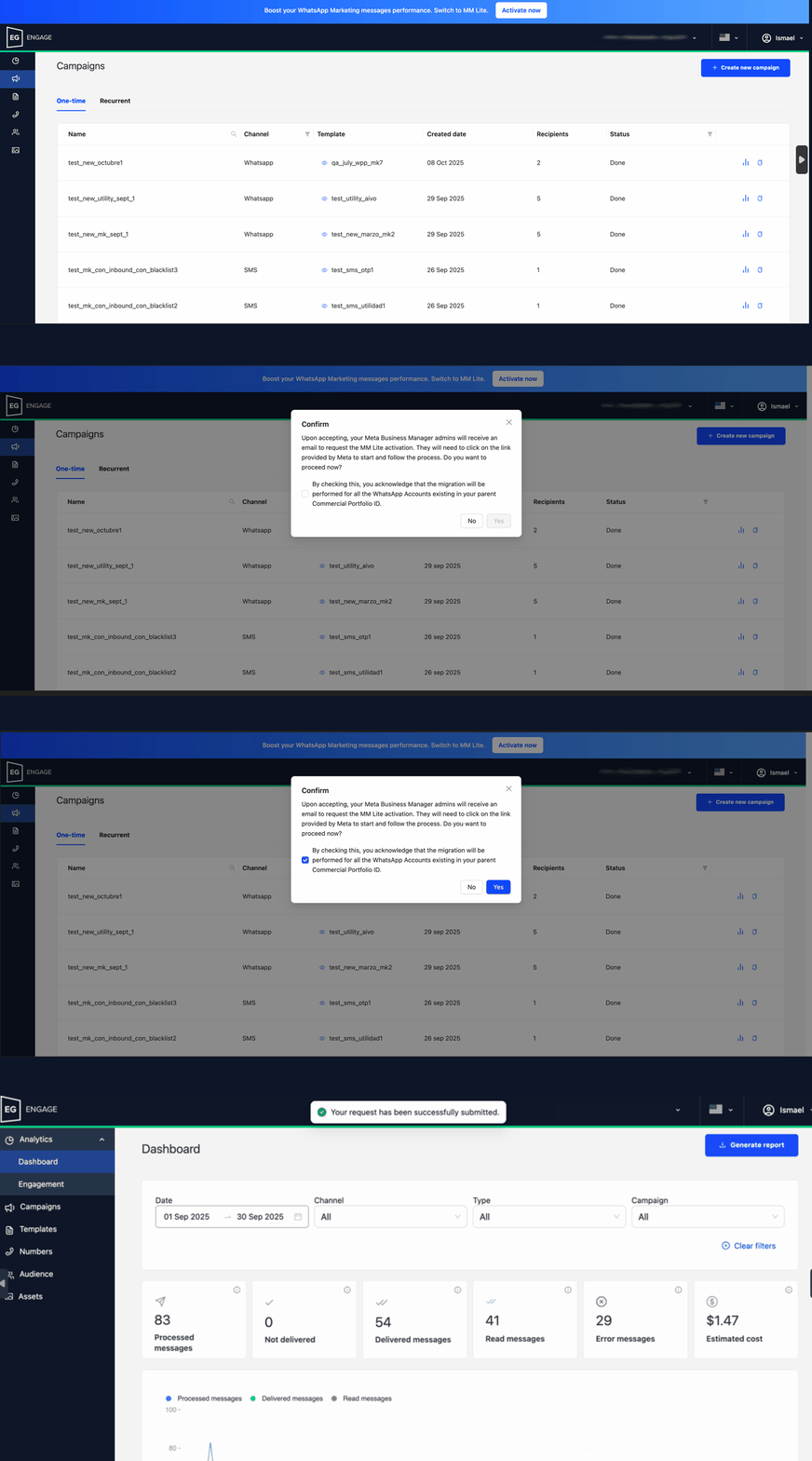
iii. Engage sends a notification to the Business Manager.
iv. Meta sends an email to all users with the Administrator role in Business Manager with instructions on how to proceed.
 In the following video, you can see, for illustrative purposes, how the steps are displayed within the Meta Business Suite settings after the notification is sent from Engage.
 Key Data
- Sending via MM Lite will only apply to Marketing templates on WhatsApp.
- You can implement it in both One-time and Recurrent campaigns.
- For Recurrent campaigns with Marketing templates on WhatsApp that are already configured to be sent through MMlite, you must include the new property “lite_api” (“lite_api”: true) in the body field of the request.
- It is possible to clone campaigns sent through MM Lite to reuse the same format in a new campaign, without having to reconfigure all the fields again.
- Technical support for this functionality is maintained through existing channels.
- Engage does not charge additional fees for this feature. Charges will depend exclusively on Meta and are adjusted according to:
- Type of template used
- Destination country
- Campaigns sent with other types of templates on WhatsApp will continue to use API Cloud.
Learn more about Marketing Messages Lite API.