When the Virtual Assistant suggests another intention in a response, it means that the way the user phrased their query doesn’t exactly match the question formats you’ve loaded into your content.
 In these cases, the assistant may:
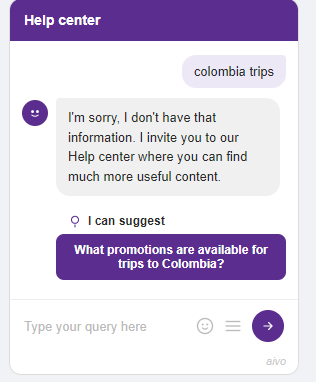
- Give an evasive answer.
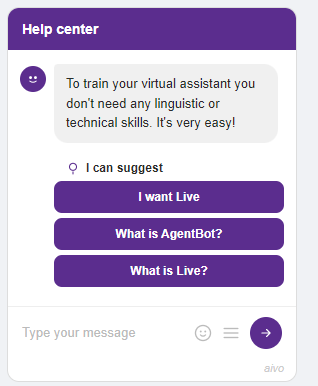
- Respond with a similar intention.
- And also suggest an intention related to the topic of the query.
This happens because, even though it didn’t correctly identify the main intention, during the understanding process, it did manage to recognize keywords or relevant terms. Based on that, it displays related questions that are more likely to connect with the initial query.
☝ Examples:
> Evasive with suggestion
> Response with suggestion
 How do you prevent an intention from being suggested? If you have an intention within Knowledge that you don’t want the assistant to suggest under any circumstances, you can easily disable that option:
- Edit the intention using the pencil icon in the Knowledge section.
- Click the lightbulb icon labeled “Stop suggesting.”
 Done! From that moment on, that intention will no longer appear as a suggestion.
☝ This can be useful for sensitive content that you don’t want to promote as an automatic suggestion, for example:
• Unsubscribing from a service.
• Filing a complaint.
• Reporting issues with a product or service.

 Important: In cases where disambiguation is required, there is a possibility that the intention will still be displayed to the user, even if it was configured not to be suggested.