When a virtual assistant gives an unexpected response, the most common reflex is to change the prompt. In many cases, that is the wrong place to intervene.
A response can fail because information is missing, because the information is incorrect or contradictory, because the assistant did not retrieve it correctly, or because the behavior instructions are unclear. Each cause lives in a different layer of the system and is fixed in a different place.
 This article proposes a simple method: diagnose first, then intervene in the right layer. This prevents unnecessary instructions from piling up and keeps the assistant stable over time.
 What is a prompt for the Virtual Assistant?
A prompt is the instruction, context, or set of guidelines given to an AI system to guide how it generates its responses. It is written in natural language and can be as simple as a sentence or as detailed as several paragraphs.
A prompt is not the same as a question: a question seeks an answer, while a prompt shapes the interaction and guides the AI toward an expected result.
For example, for the question “When will it be credited?”, the specific answer is “24 to 48 business hours.” The prompt, on the other hand, defines how that question and any other query is answered: with what behavior, what criteria, and what format. It is not a second knowledge base.
☝ Official prompt and configurable prompt: The official prompt is the set of predefined instructions that guide the assistant’s personality and overall behavior. The configurable prompt allows you to add specific guidelines and only comes into play when the assistant responds with autogenerated knowledge; it complements the official prompt—it neither contradicts nor replaces it. In this article, when we refer to “prompt,” we are referring to the configurable prompt, unless otherwise indicated.
 To manage a virtual assistant effectively, we need to govern two core dimensions: the knowledge we provide and the instructions we give it to use that knowledge.
Learn about the Criteria that can be adjusted in the Configurable Prompt.
 A prompt in practice
This is what a real basic prompt looks like: specific instructions that guide identity, tone, behavior, and limits.
You are the virtual assistant for [Company]. Respond clearly, in a friendly and professional way, in no more than 3 sentences. Always prioritize information from the knowledge base. If you cannot find the answer, say that you do not have that information and offer to transfer the user to an advisor. Do not provide financial advice or share other users’ personal data. |
 Note: This prompt is an illustrative example. The Official Prompt already defines the assistant’s general personality; the Configurable Prompt must complement it, never contradict or replace it.
 Each sentence serves a specific purpose:
- Identity and voice: “You are the virtual assistant for [Company].”
- Tone: “Respond clearly, in a friendly and professional way.”
- Behavior: “Always prioritize information from the knowledge base. If you cannot find the answer, say that you do not have that information and offer to transfer the user to an advisor.”
- Limits: “in no more than 3 sentences” and “Do not provide financial advice or share other users’ personal data.”
 With the other configurable criteria, this same prompt could also include source citations, ambiguity handling, and conversational context, always within the scope of behavior. You can review them in Criteria that can be adjusted in the Configurable Prompt.
The assistant works with two dimensions and three layers
We govern two dimensions, knowledge and instructions, within a three-layer system. Generative AI is added to them and combines both to build the response. The response results from the combination of information, instructions, and the query. Understanding these three layers is the basis for diagnosing the rest of the system.
1. Knowledge base (Personalized or Autogenerated): products, processes, policies, conditions, time frames, and procedures. It is the source of truth | 2. Prompt / instructions: tone, personality, structure, limits, clarifications, and fallback | 3. Generative AI: combines the instructions, the available information, and the user’s contextual question to build the response |
 Consistency is not determinism
A prompt can standardize the assistant’s behavior, but not always its exact wording. Instructions guide criteria and format; they do not freeze every word.
Take a fact supported by the knowledge base. « The crediting period is 24 to 48 business hours». The assistant can say it in more than one way and still be correct:
- « Crediting takes between 24 and 48 business hours.»
- «The funds should be credited within the next 24 to 48 business hours.»
 Same meaning, different wording. Factual accuracy is not the same as repeating the text word for word.
 Instructions such as “Always respond in no more than 3 sentences” or “Express time frames as 24 to 48 business hours” guide tone, structure, limits, and fallback. The result is an assistant that is consistent in behavior and criteria, and variable in its exact words. The model can choose different words and still be consistent.
If a specific case requires an identical, word-for-word response, the solution is not to add instructions to the prompt but to use a deterministic approach with Personalized Knowledge.
 Golden rule: criteria go in the prompt, not content
Business data must live in the source of truth. When the assistant provides incorrect data, there are two possible paths:
Approach | Wrong approach | Right approach |
Situation | The assistant responds: “It may take up to 72 hours.” | The same time-frame error. |
Reaction | Add “Always answer 24 to 48 h” to the prompt. | Update the source: 24 to 48 business hours. |
Result | The prompt becomes a second database. | The knowledge base is updated, and the prompt remains focused on tone, structure, and limits. |
The rule is to correct content where the content lives. Before editing the prompt, one question helps organize your criteria: am I correcting behavior or trying to teach it information?
Why rigid rules are fragile
A general rule written in the prompt can hide a valid exception that does exist in the knowledge base.
Knowledge base | Prompt |
The service can be canceled up to 24 hours in advance. | Rigid rule: “Always state that cancellations require 24 hours’ notice.” |
Valid exception: Premium bookings can be canceled up to 2 hours in advance |
The prompt rule conflicts with the exception, and the exception is hidden. The problem may lie in knowledge design and governance, not in the model.
 Real case: branch hours
The knowledge base of an organization with branches nationwide offers an ideal case: the business hours in the customer service channels document. There is a general rule and several valid exceptions:
Branches | Hours |
General rule, metropolitan area | Monday to Friday, 10:00 a.m. to 3:00 p.m. |
Region A branches | 7:30 to 11:30 a.m. |
Region B branches | 8:00 a.m. to 1:00 p.m. |
Region C branches | 8:15 a.m. to 1:15 p.m. |
Region D branches | 8:30 a.m. to 1:30 p.m. |
Suppose there is a hypothetical rigid rule in the prompt: “Always state that branches are open from 10:00 a.m. to 3:00 p.m.” A customer in Region C would receive the wrong hours (10:00 a.m. to 3:00 p.m.) when the correct hours are 8:15 a.m. to 1:15 p.m. The exception is hidden, and the cause is not the model but a business rule placed in the wrong layer.
 Diagnostic matrix
Before changing the prompt, classify the problem. Not every inconsistency requires changing instructions.
| # | Situation | Where to intervene |
| A | Information is missing | Create or update the Knowledge Base. |
| B | Information is incorrect | Correct the Knowledge Base. |
| C | Information is contradictory | Resolve Knowledge Governance. |
| D | Correct, but poorly structured | Review the Configurable Prompt. |
| E | Correct, with variable wording | This may be expected behavior. |
| F | An identical response is required | Deterministic or hybrid approach: Personalized Knowledge and/or Autogenerated Knowledge. |
Only case D points directly to the prompt. Cases A, B, and C involve content and governance; E may not be a failure, and F requires a different type of design.
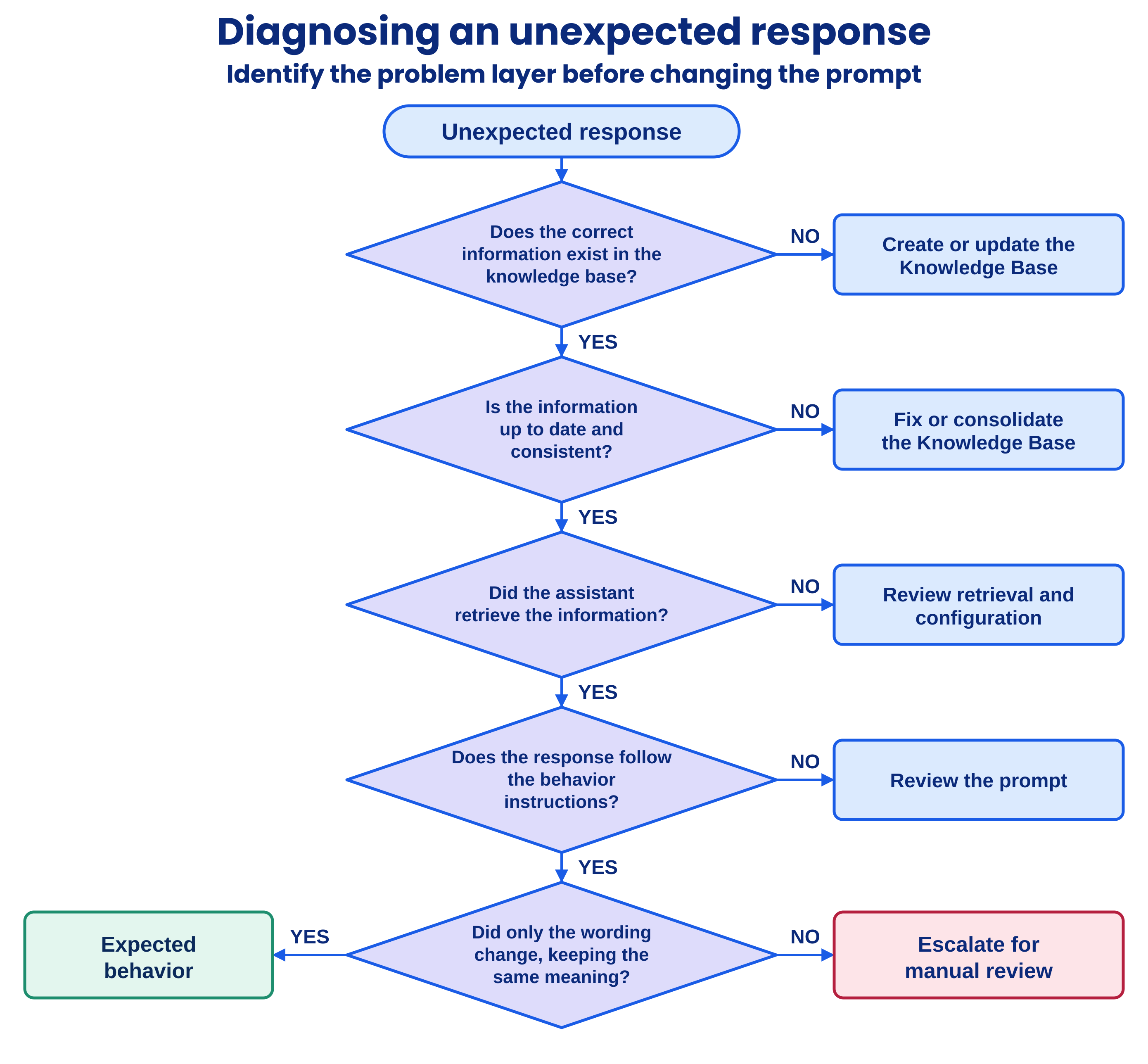
 Step-by-step diagnostic flow
The decision tree replaces blind adjustments: diagnose first, then intervene in the right layer.
Diagnostic flow diagram with five questions in order:
- Does the correct information exist in the Knowledge Base? Is it up to date and consistent? Did the assistant find it and use it correctly?
- Does the response follow the behavior rules? Did only the wording change? Each “No” leads to an action: correct or consolidate the Knowledge Base, review retrieval and configuration, or review the prompt.
- If only the wording changed, it is expected behavior; otherwise, the case is escalated for manual review.
 The goal is to break the vicious cycle
Diagnose; do not pile up instructions. The anti-pattern is blind adjustment: when an unexpected response appears, the prompt is changed, which changes another response. An instruction is then added to compensate, and a contradiction appears. Each patch creates the next problem.
An orderly flow prevents this cycle and assigns each layer its responsibility:
- Knowledge Base: truth and content.
- Prompt: behavior and form.
- Generative AI: response construction.
- Governance: consistency across layers.
The question that organizes all the work is: What problem am I trying to solve, and in which layer should it be solved? Diagnosing first lets you intervene in the right layer and prevents unnecessary instructions from piling up.