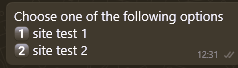
If you apply conditions by topic to answers on asynchronous channels (Facebook, WhatsApp, Instagram, etc.), the conversation will begin with a numbered list of options, each corresponding to a set condition.
For example, if the condition is based on whether the user is a customer, the following could be displayed:
- "I am a customer."
- "I am not a customer."
Once the user chooses one of the options, all answers from the virtual assistant will follow the same single condition selected.
 Key facts:
◉ On these channels, the condition will remain active for 24 hours. If the user interacts with the bot again before that time, the condition will remain active.
◉ After 24 hours have passed since the last interaction, if the user consults the bot again, the initial list of conditions will be displayed.
◉ If the channel has GDPR enabled, the user will be asked to accept the terms and conditions when they ask their first question. If they do not accept, they will not receive a response from the virtual assistant. Once they accept the terms and conditions, a message with numbered options (conditions) will be displayed, and they must select one to start the conversation with the virtual assistant.
◉ If you use initial button panels, keep in mind that since this is an external conversation window (Facebook, WhatsApp, Instagram, etc.) connected to the Virtual Assistant platform, it is not possible to lock the text box to prevent the user from responding to anything other than the options provided, as is the case with a web channel. Therefore, in asynchronous channels, the flow will be as follows:
- The user interacts with the bot.
- The first answer at the beginning of the session will always be to condition the content (similar to the initial button panel).
- Once the condition is chosen, a response will be provided to that initial interaction, if there is one for that condition.
- If the user does not respond with any of the options, the bot will respond again with the initial message and the numbered list.
- Once the user chooses one of the corresponding numerical options, the bot will respond to the previously entered query
 This is a visual example in WhatsApp: