This node allows you to host and view information associated with the conversation ID. It is useful for sending information on the derivations with human care agents. In this scenario, all the information we store using this node will be provided at the end of the stream containing the derivation node.
To test this flow, you must replace the "value" variable (in each of the instances in the example) with the ID of a conversation, which can be found as the value of the key "id" within the object located in the "agentbot_user" parameter, which you can view by placing a debug node in the first step, of the first user interaction through the bot window.
Example:
"agentbot_user": {
"name": "John Doe",
"id": "123456789conversationIDExample123456789",
"phone": "11111111111",
"lastSessionId": "111111111",
"extra": {
"lastSessionId": "111111111"
}
}
To use it we have different ways of implementation:
The main thing is to capture and save the "Id" data. This data comes within the agentbot_user parameter, which in turn comes inside the payload on the first interaction through the bot window. This data can then be retrieved from the session-storage node using the mustache interpreter "{{variable}}" or by passing it as a direct parameter in the ID field of the same.
Using the "Method" field selector we can select between "GET" and "PUT". GET is used to view all past session ID information as a parameter. PUT serves to store data in the session-storage, also passing as a parameter the same ID of the conversation.
 Some data to be taken into account are:
- This node is less performant than the cache node so for the sole purpose of persisting information between streams, it is recommended to use the caching node.
- The JSON you want to host should not exceed 1000 characters, as it has a limit on this length for optimization purposes, and the key "ID" is a reserved word, therefore it cannot be placed in the JSON. Cannot host null or empty data.
- Both GET and PUT operations perform an output of the "agentbot_user" object with the session information, either with a simple get as the result after put.
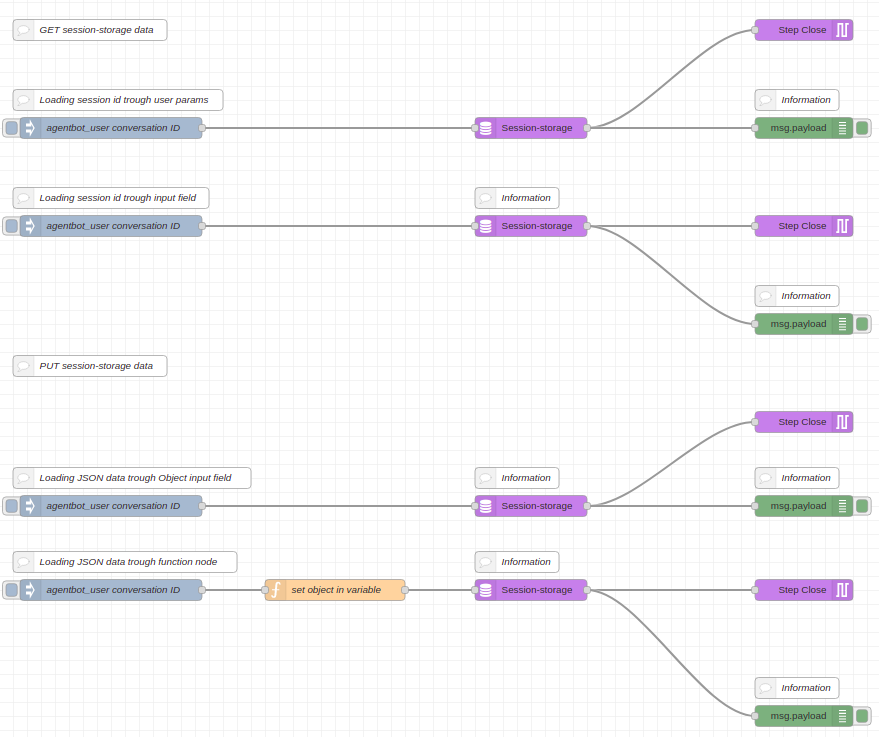
Download the flow by clicking on this link.