Once the conversation with the agent is over, the user will be able to rate the service, giving feedback on the service received.
You will be able to configure a particular type of feedback per customer service group, so that each one can have its own metrics according to the established quality standards.  It will be the satisfaction survey that your customer receives.
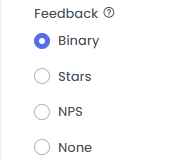
 Go to the Groups section > Edit > Feedback.
The available feedback types are:
Binary: positive or negative.
Stars: will rate with the five-star method, with 1 being the worst and 5 being the best.
NPS: the Net Promoter Score is rated from 1 to 10, with 9 or 10 points being promoters, 7 or 8 points passive and 6 points or less detractors.
None: you can choose that the user does not receive any type of survey when ending the conversation with an agent.
The message that accompanies the feedback request is generic and if your profile is supervisor, administrator or agent supervisor, you can modify it from the Settings > Messages section.
 The survey will only be active for 20 hours and if the user provides their response after this period, it will not be recorded in the metrics.