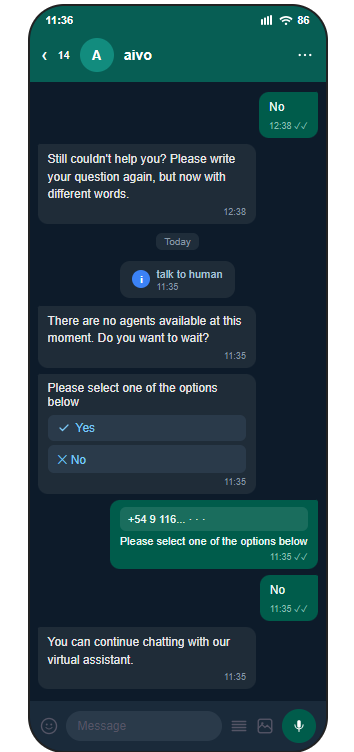
If your customer service model includes asynchronous channels such as WhatsApp, Instagram, or Facebook, you can transfer conversations to Live and, in turn, specify that during hours when agents are not online, users are given the option to join a waitlist to be assisted when agents become available again, or to continue chatting with the virtual assistant.
You can enable asynchronous mode through the derivation rules within the Virtual Assistant platform.
|
|
 So, if a user needs to be transferred to an advisor outside of business hours, the bot will send an automated message indicating that no agents are available. It will then ask if the user would like to wait until an agent comes online.
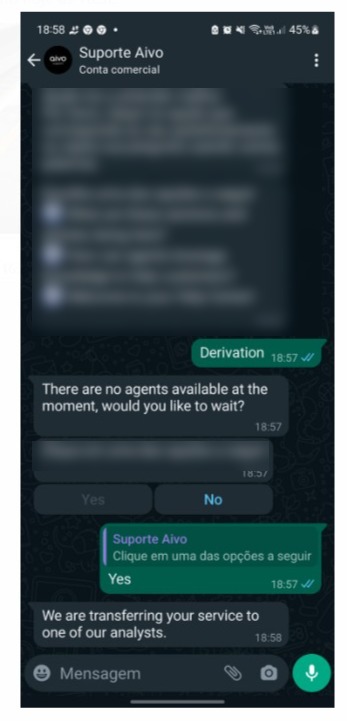
If the user selects YES as the response,
- The custom message configured in the “Transfers” section for this specific transfer within Virtual Assistant will be displayed.
- As part of the Virtual Assistant platform's internal process, the conversation with the virtual assistant will be closed and transferred to the Live platform.
- The conversation is marked as transferred.
- The user remains on hold until an agent connects to the Live platform; in other words, the conversation will never be forced to close.
- If you have direct transfer configured, the user will not be able to continue chatting with the virtual assistant once the conversation is transferred.
- If you do not have direct transfer configured, the user can continue chatting with the virtual assistant while waiting, if they wish. If this happens, the Virtual Assistant Chat Report will record two separate chat sessions:
- A session tracks the initial conversation that takes place before the customer agrees to wait to be assisted by an agent; this session will be marked as “Transferred” regardless of the reason.
- The second session contains the conversation with the virtual assistant while the user was waiting for the transfer. If another transfer is generated during the second session with the virtual assistant, the transfer message will be displayed to the user. However, in Live, since the user was already transferred the first time and remains on hold, the transfer is not generated again.
- Once the agent is available, the customer will be notified.
- In Live, the agent will see conversations that are on hold in the same way as other conversations, via the chat window on the left side of the screen.

 Wait time: According to WhatsApp’s policy, the maximum limit is 24 hours, the amount of time WhatsApp allows a session to remain inactive. In other words, a session in pending status closes after 24 hours of inactivity. This applies to both user and agent inactivity. Wait time: According to WhatsApp’s policy, the maximum limit is 24 hours, the amount of time WhatsApp allows a session to remain inactive. In other words, a session in pending status closes after 24 hours of inactivity. This applies to both user and agent inactivity. |
If the customer chooses NOT to wait, they continue chatting with the virtual assistant, and the conversation is not considered transferred or ended.