Keep in mind that prior to this process you must coordinate with your Aivo team (ONB/CSM/AE) the commercial and implementation conditions of this new channel. Keep in mind that prior to this process you must coordinate with your Aivo team (ONB/CSM/AE) the commercial and implementation conditions of this new channel. |
 To create the Voice service channel you must follow these steps:
- Complete this checklist with the required information. In the link you will find a model, but you will receive your editable version, for greater ease when you start the process.
- After completing your checklist, request the creation of the channel through a Service Request in Aivo Support Center.
- The ticket subject (TK) should be "Create Voice channel + your organization name."
- It is key that you include it in the description space of the TK.
- The complete Checklist document, attached.
- The language of the bot where you will add the channel + regionalism.
- BotID. You can consult this information with your ONB/CSM/AE.
- Move forward with the Configuration process: in the same ticket you created, the Aivo team will respond with the Connection Workbook in editable format so you can complete it.
- The first tab of the file, Voice Technical, will give you the information you need to configure the channel on your IP PBX. If you activate it by the virtual number method, this content will not apply.
- The Customer Technical Information tab is mandatory, so you must complete it regardless of the connection method.
- Once you have completed the Connection Workbook with all the requested information, you will attach it to the TK where you made the request at the beginning.
- Our team will finish configuring the channel with the confirmed parameters and we will inform you in the same TK when it is finished.
- Once the implementation of the channel is confirmed, you can call from your IP center or the assigned virtual number to verify productive operation.
| ℹ️ Workbook: is an electronic document that has detailed information about the configuration and technical requirements necessary to set up the Voice channel. It may include sections such as technical details, setup instructions, and connection requirements. |
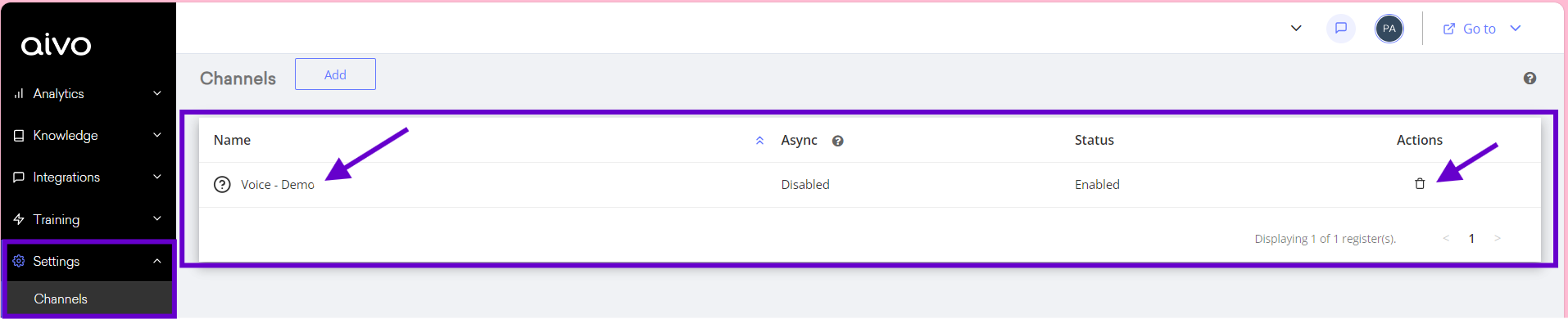
When the process is finished you will be able to see your Voice channel from the AgentBot platform, in the Settings  Channels section. Keep in mind that you will have access to delete it from the platform interface, however, you must give notice via Service Request to remove the connection with the infrastructure.