
 How the status change works
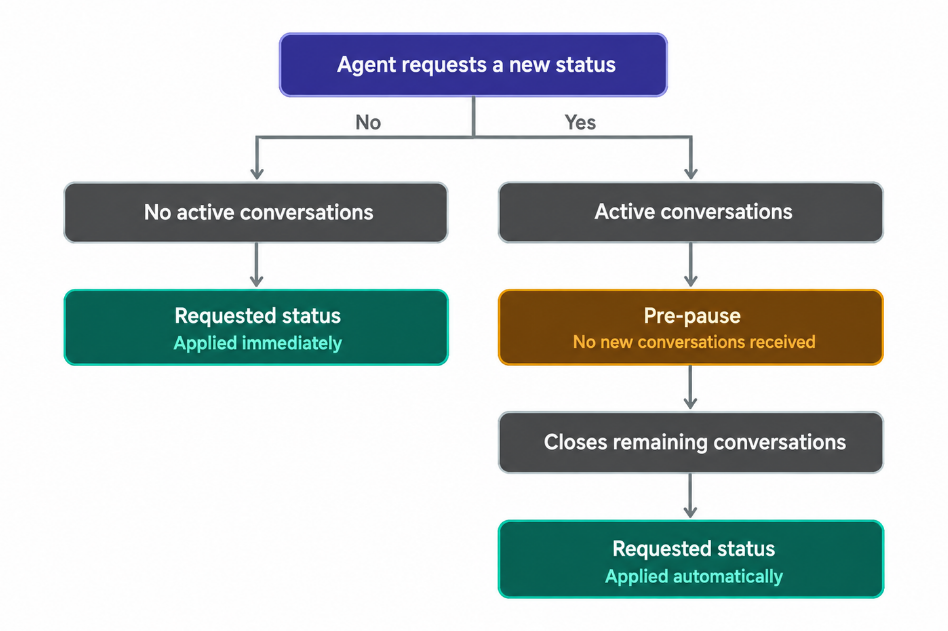
- When an agent selects a pause, the system checks whether they are currently handling conversations.
- If they have no active conversations, the system follows the behavior described in Statuses and Pauses in Live: the agent's status changes immediately to the selected pause.
- If they have active conversations and this feature is enabled, the agent first enters Pre-pause.
- During this time:
- They can continue handling the conversations already assigned to them.
- They do not receive new conversations.
- They see a notification in the top menu indicating that they are in Pre-pause mode.
- When they close the last active conversation, their status automatically changes to the selected pause.
- During this time:

 Key details
a. Only users with the Administrator rolecan configure this option.
b. Once enabled, this setting applies to all users with the Agent profile.
c. If you have more than one Live instance, you must configure each one individually.

 If break request control (Break Request) is also enabled
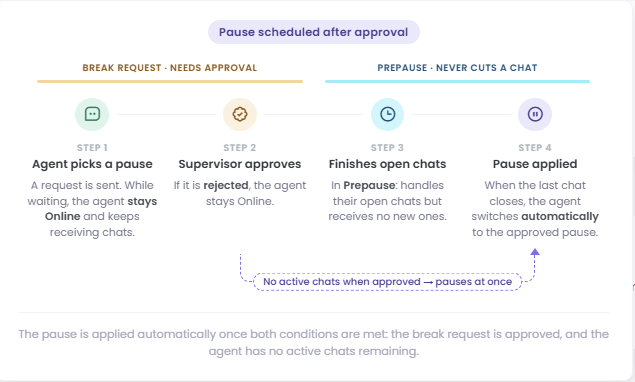
- When both features are enabled, the agent's request must be approved before they can enter a pause or Pre-pause.
- While waiting for approval, they remain Online and can continue receiving new conversations.
- If the request is rejected, they remain Online.
- If the request is approved, the system checks for active conversations at that moment: if there are none, their status changes immediately to the approved pause; if they have active conversations, they enter Pre-pause and stop receiving new ones.
- When they close the last active conversation, their status automatically changes to the approved pause.
 To learn how to configure this control and manage requests, see:

 Watch the example below to see the complete process: