 After learning how to prepare for the pricing change on WhatsApp Business, you can use this guide, a series of tips for optimizing WhatsApp conversations and reducing the number of messages needed to resolve a request.
 Keep in mind that Meta’s billing is now based on “message turns”: in the WhatsApp Business API, this is the unit of measurement Meta uses to track and bill conversations between businesses and users.
A message turn is defined as a single message sent by the business to a user, or the business’s response to a message from the user.
|
• In the examples in this guide, these optimizations reduce message volume and associated cost by 50% to 80%, depending on the case. Most scenarios fall between 50% and 71%, while some specific cases reach 80% savings. • The values are for reference and must be validated against current WhatsApp Business rates before making decisions or scaling changes. |
 The key pillars are:
| 1. Choose the right channel and type of support. |
2. Design shorter, more comprehensive conversations. |
3. Automate using Gen AI and WhatsApp Flow. |
1. Choose the right channel and who provides support
Not every interaction needs to be resolved in WhatsApp. Route each case to the most efficient channel and reserve WhatsApp for interactions where it truly adds value.
| A. Take advantage of the free 72-hour window |
In a conversation started from a Click to WhatsApp ad, service messages sent during the first 72 hours do not generate a cost.
• After that period, they are billed normally. This condition applies only to this type of conversation. It does not mean that all conversations have a free 72-hour window. For other cases, review the standard attention window and the current WhatsApp Business rates.
| Click on the Ad → Click to WhatsApp → 72 Hours of Free Support Messages |
After 72 Hours → Billed as Usual |
| The first interaction after the click is the most valuable one you have: Resolving the issue at that moment means resolving it for free. | |
 Design campaigns and journeys that take advantage of this window when relevant to the use case. Design campaigns and journeys that take advantage of this window when relevant to the use case.
| |
|
B. Promote other channels |
For low-value or high-volume requests, offer alternatives such as the app, web portal, or Voice. WhatsApp can be reserved for processes that require continuity, notifications, or a conversational experience.
Think of these channels as complementary: WhatsApp can be the entry point and, depending on the customer’s need, the interaction can continue on the web, through Voice, or in the app.
As support and sales volume increases, prioritize optimized processes and automations that allow you to handle more cases without proportionally increasing the number of agents or messages.
| C. Identify where the spending is concentrated |
Cost per resolution: the charge is calculated for each turn the bot or agent needs to resolve an intent, not for the entire conversation.
Therefore, to estimate consumption, count billable turns rather than only the number of conversations.
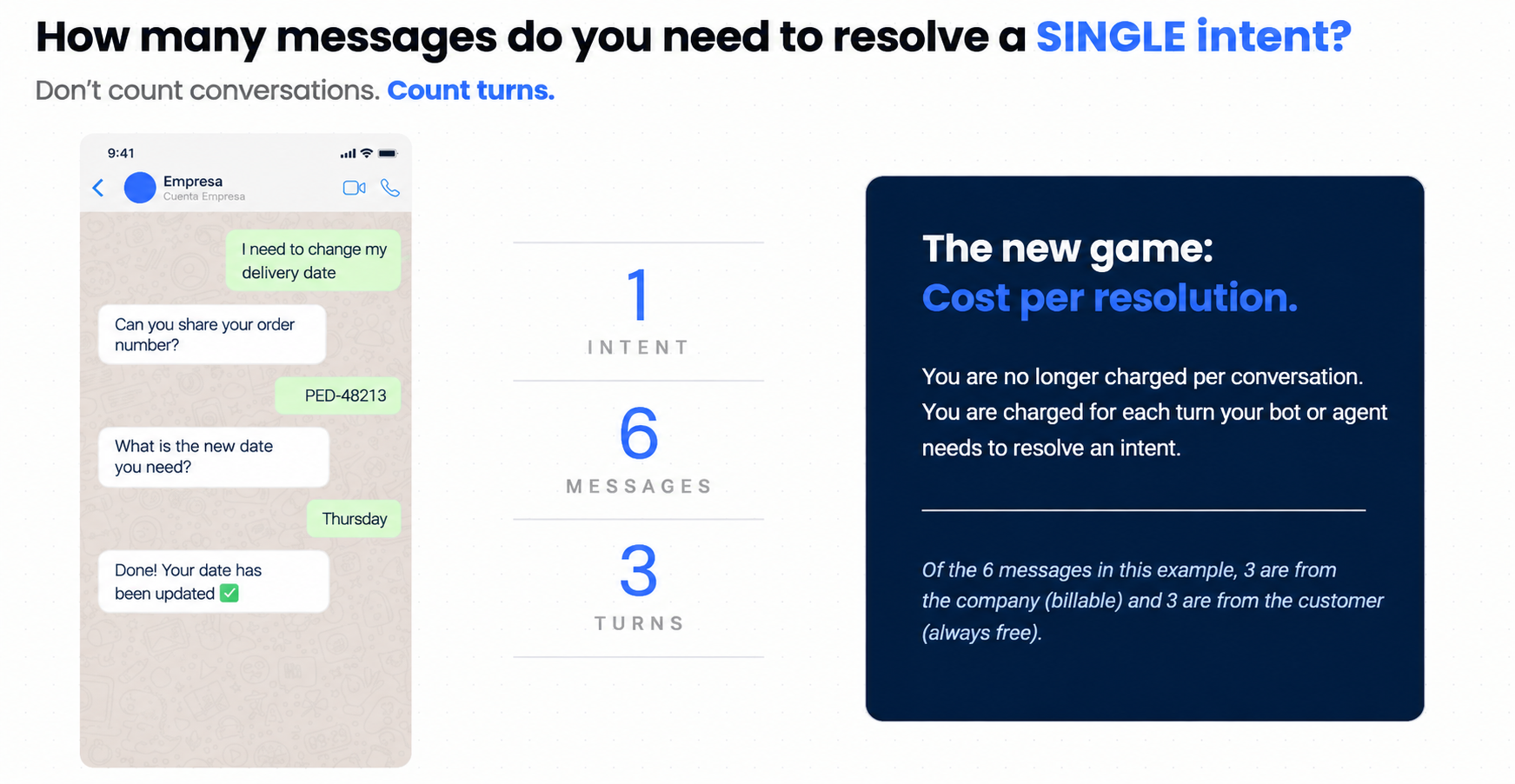
 To decide which flow to review first, multiply:
| Monthly flow volume × average number of messages per conversation = potential flow consumption. |
 The result identifies opportunities better than conversation volume alone. A flow with fewer inquiries may be a priority if it requires many billable message turns to complete.
In addition to volume and message count, look for these signals:
- Requests for data that is already available. For example: “What is your customer number?”
- Journeys with long waits.
- Unnecessary transfers.
- Long processes within the chat.
- Disconnected systems.
| If a flow presents two or more of these signals, it probably has room for optimization.
|
| D. Human support also generates charges |
When the conversation is transferred to an agent, the messages they send also generate charges. To control this consumption:
- Create response templates for agents.
- Summarize the information in a single bubble whenever possible.
 Define whether a response should be sent as a single message or split into separate messages through WhatsApp.
- Edit scripts from Settings > Messages. Explore Live’s automatic message settings.
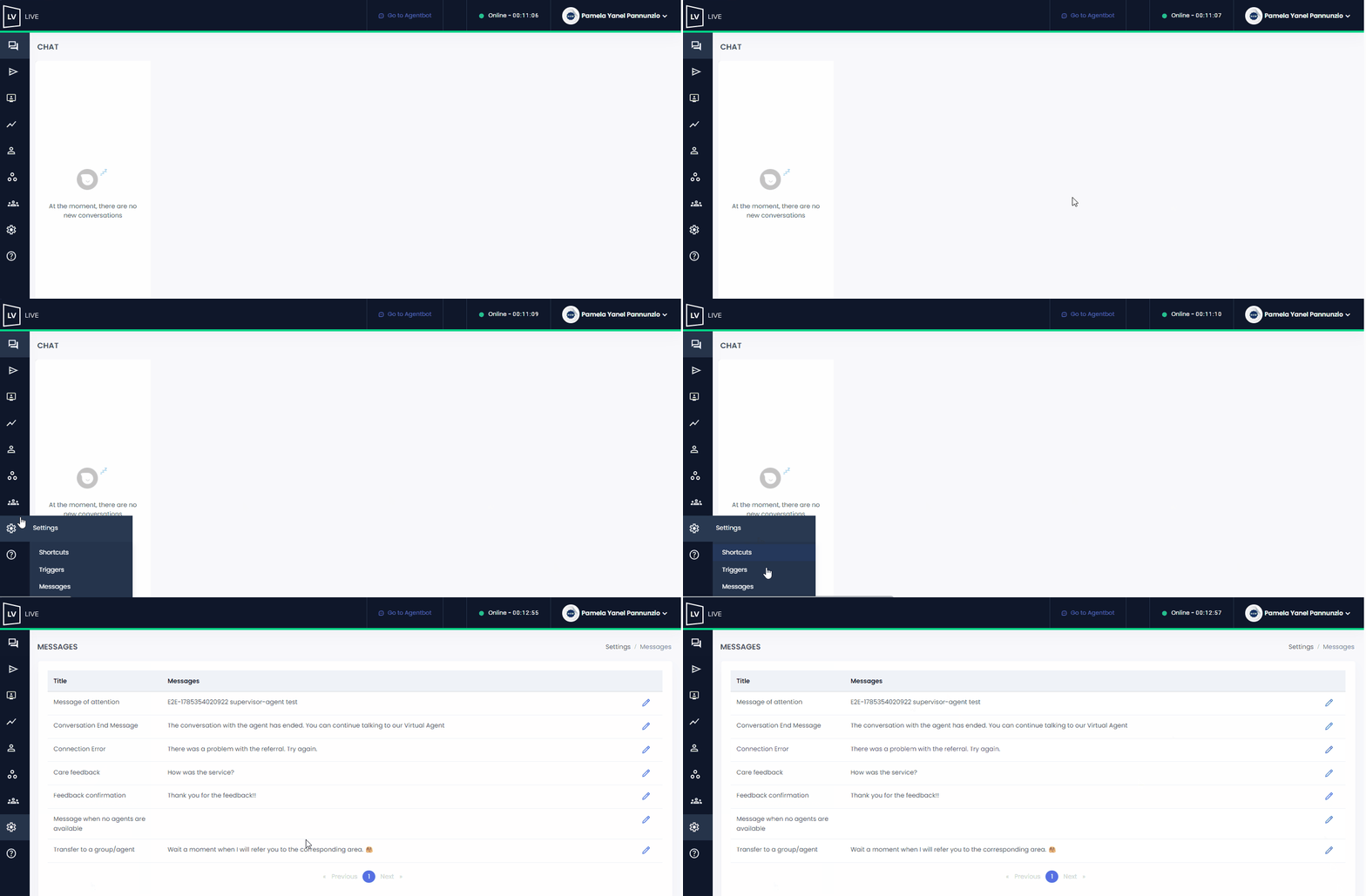
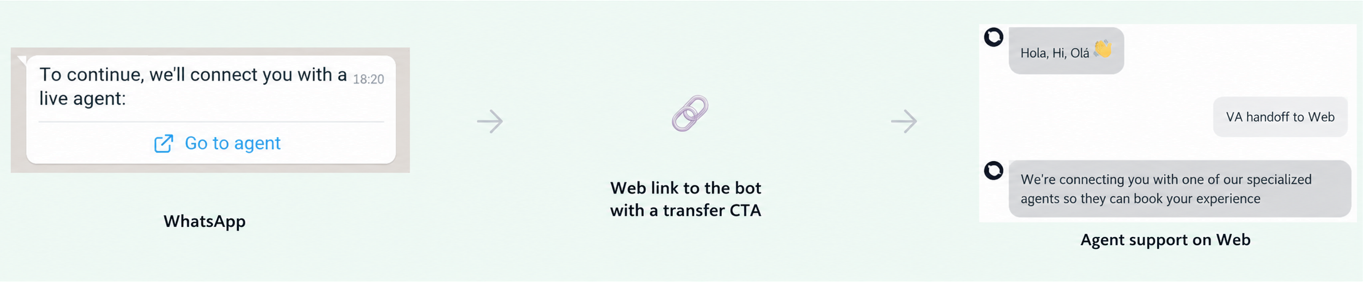
- If the case requires extensive human support, consider routing it to another channel, such as a web link with agent support. Before doing so, keep in mind that the conversation history will not be retained when support is transferred to another channel.
2. Design shorter conversations
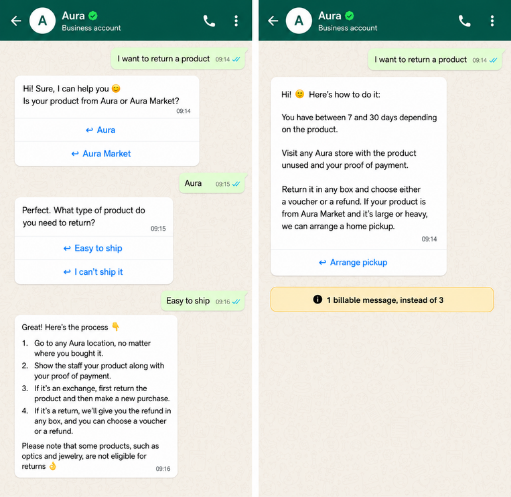
Most flows can be streamlined from two or three billable steps to just one without changing the content the user receives.
- Before redesigning a flow, review the welcome, empathy, courtesy, reminder, and confirmation messages. Identify which ones can be consolidated into a single response and eliminate redundant steps that do not directly contribute to the resolution.
| A. Start with a single bubble |
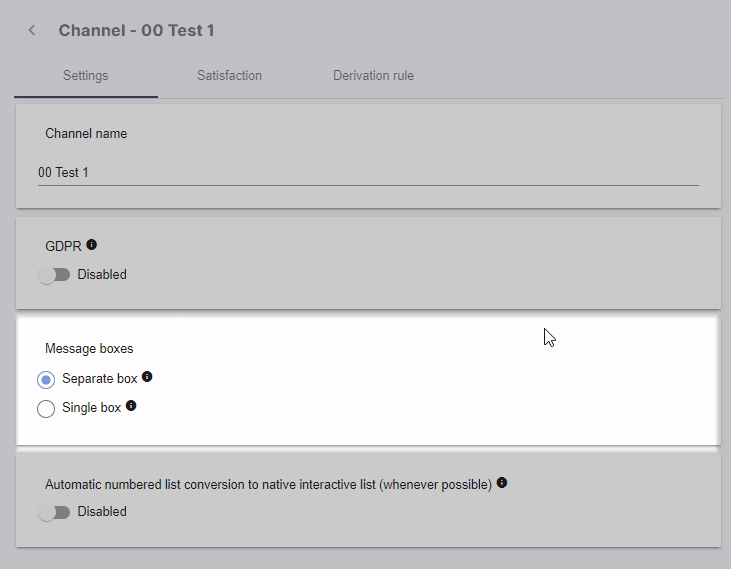
Configure text delivery so that a complete response arrives in a single bubble instead of being split into several consecutive messages.
- Verify that a longer response remains easy to read and navigate. The goal is to reduce separate messages without harming the user experience.
Configuration path: Settings > Channels > Message bubble > Single bubble.
| B. Resolve the request completely in one interaction |
Include the information the user needs in the same response: schedules, addresses, requirements, steps, and links.
- Avoid forcing the user to answer questions that the assistant could resolve with information already available.
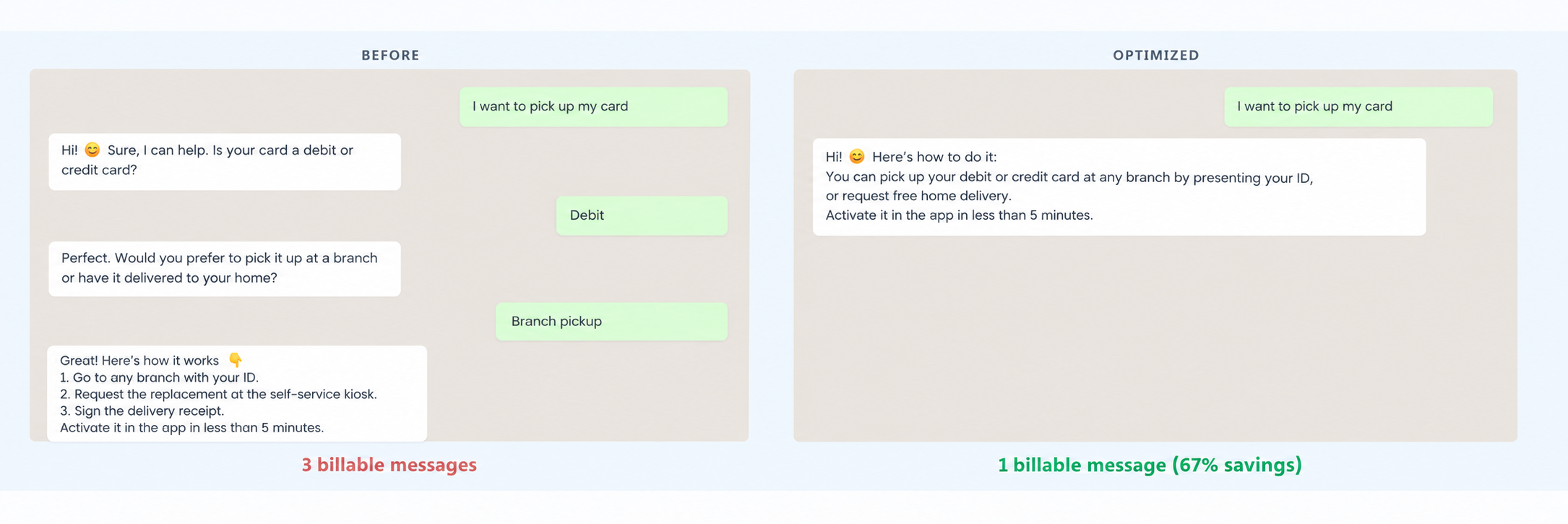
Example: card pickup
- Before, the flow asks for the card type and pickup method, and then provides the procedure.
- In the optimized version, it explains in a single response that a debit or credit card can be picked up at a branch or delivered to the customer’s home, and includes the next step.
| The result is a reduction from 3 billable message turns to 1, with a reference reduction of 67%.
|
 Visual example: Processing a card withdrawal in a single transaction.
| C. Review interactive elements and attachments |
Images, videos, attachments, and interactive buttons may add billable message turns to the same conversation. Use them only when necessary.
- Reduce images and videos when text is sufficient.
- Replace attachments with URLs the user can open outside WhatsApp when this does not affect comprehension.
- Group several options in a list element within a single message.
- Integrate explanatory text into the body, footer, or description of the element when the configuration allows it.
Visual examples: reducing add-ons, replacing attachments with URLs, and using lists.
The examples show three optimizations:
- Recharge instructions: from five messages to one, with a reference reduction of 80%.
- Requirements in PDF: from two messages to one, with a reference reduction of 50%.
- Service catalog: from three messages to one, with a reference reduction of 67%.
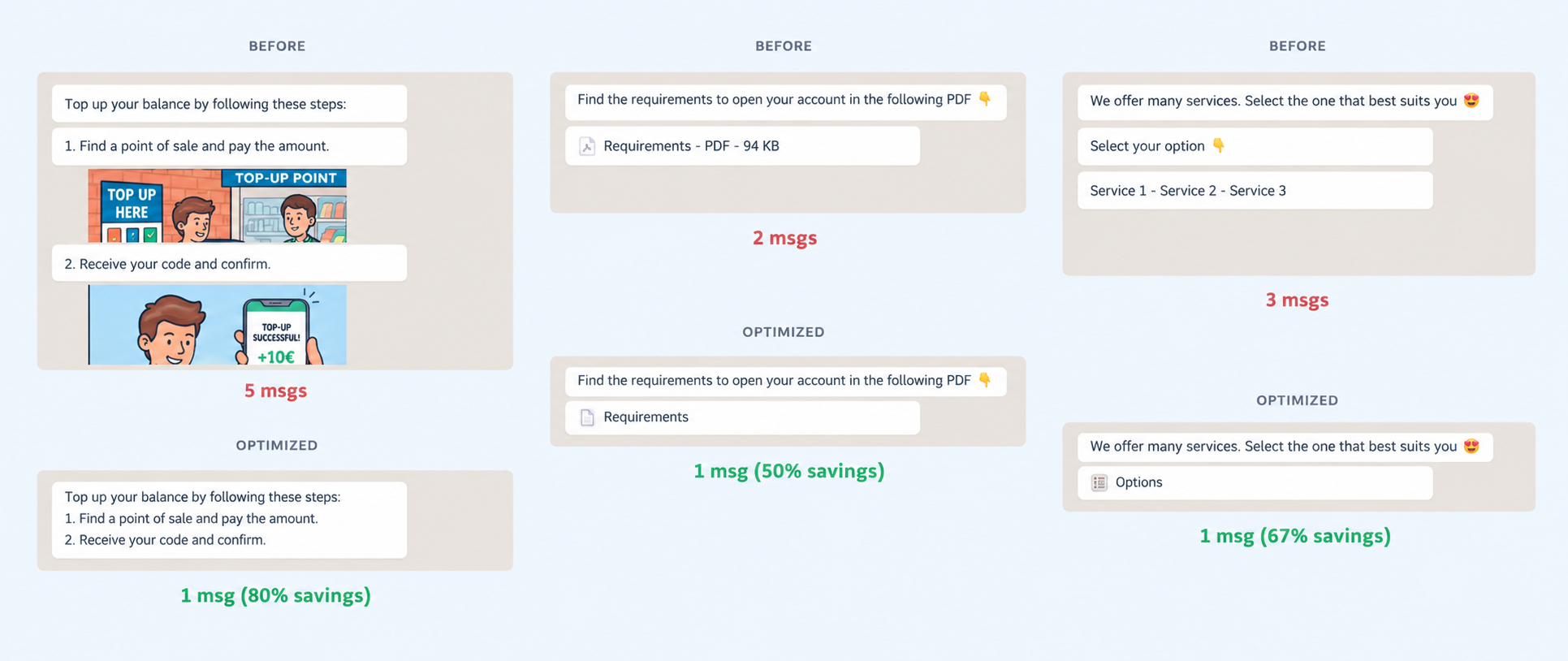
The examples for PDF requirements and service catalogs will be resolved automatically with the adjustments we have incorporated.
You can review this change in: The same content in a single bubble: optimizing WhatsApp conversations.
3. Automate with WhatsApp Flow and Gen AI
| A. Use WhatsApp Flow to collect multiple pieces of information |
When a process requires an address, date, time, and phone number, each question and answer can become a separate message. WhatsApp Flow collects this information in a form within WhatsApp.
Example: scheduling a technical visit
- The conversational flow in the example uses 7 billable message turns. With WhatsApp Flow, the user completes the information in a single form and receives the final confirmation: 2 billable message turns in total.
- With the reference value used in this guide, this represents an approximate 71% savings.
You can use WhatsApp Flow for processes such as:
- Scheduling a visit.
- Requesting a service quote.
- Confirming or updating information.
- Registering a request.
In addition to reducing the number of messages, WhatsApp Flow allows you to structure and validate data before the user submits the form. This helps reduce typing errors and incomplete information.
- WhatsApp Flows may involve associated Studio costs.
- You can integrate the result with your CRM and validate the impact on pricing with your team before scaling the flow.
Visual example: Scheduling a technical visit with WhatsApp Flow.
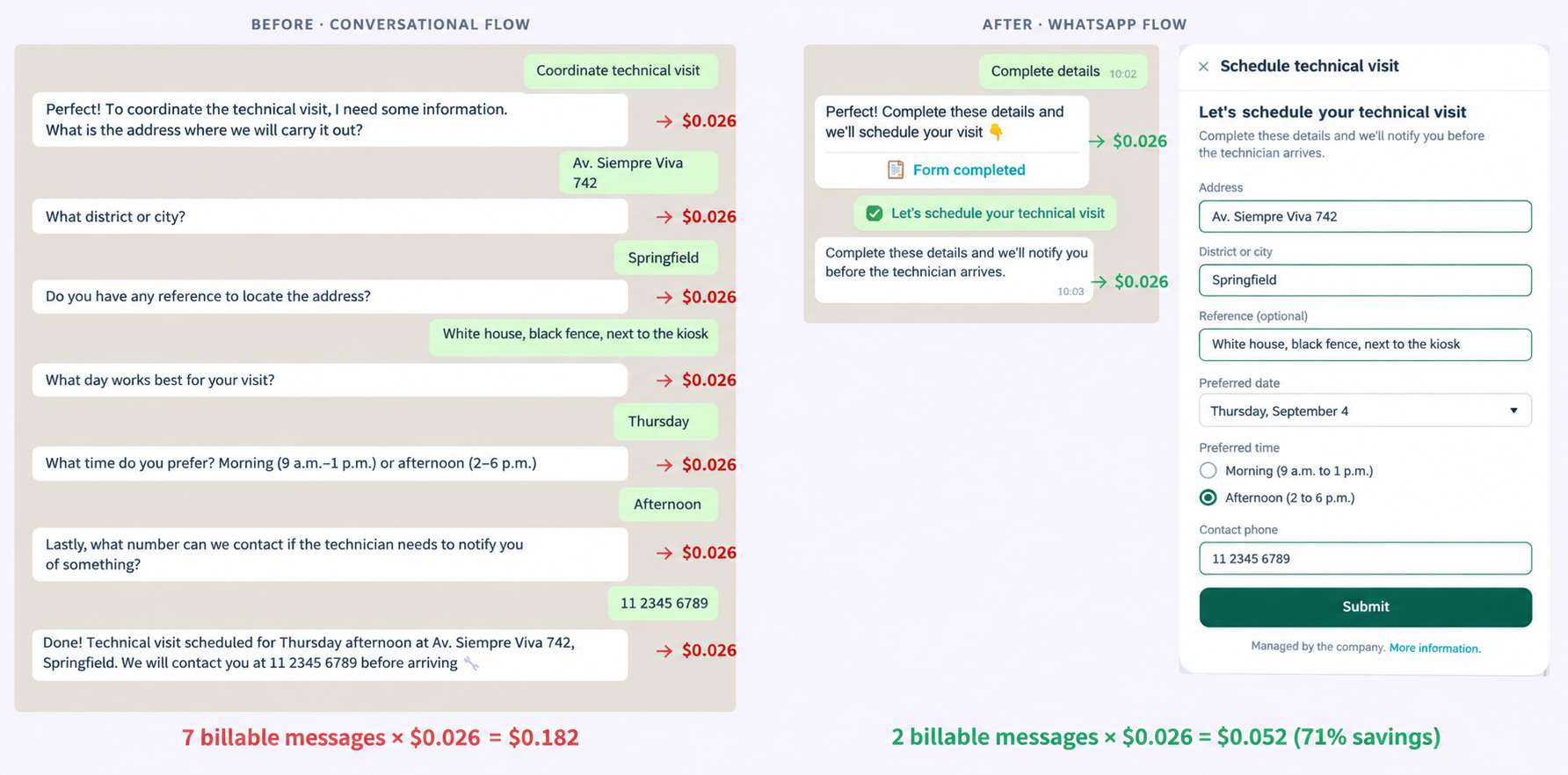
| The result is a reduction from 7 to 2 billable message shifts. |
| WA Flows may incur associated Studio costs
|
| B. Automate combined questions with Gen AI |
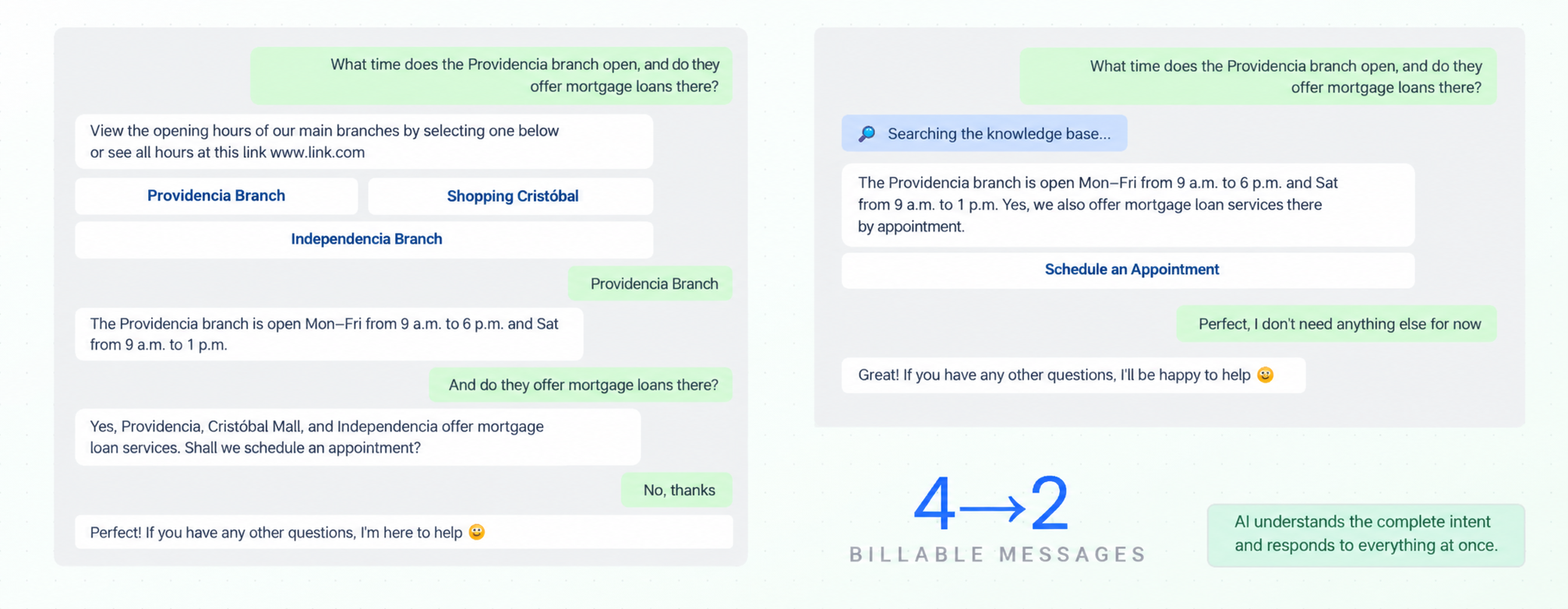
When the assistant follows fixed rules, a question involving several topics may trigger separate journeys. With Gen AI, it can interpret the complete intent and answer everything at once.
- You can also combine a guided flow with Gen AI: AI interprets the customer’s need and directs them to the most appropriate flow or specialist.
- This hybrid approach helps prevent the user from going through blocks that do not correspond to their request.
Example: branch hours and mortgages
- The question combines two needs: finding out the hours of the Providencia branch and whether it offers mortgage loans.
- Before: 4 billable messages.
- With Gen AI: 2 billable messages.
- Reference reduction: 50% in the number of messages for the case.
To prioritize this type of automation, review which questions are repeated most often in your knowledge base and which ones commonly combine several topics.
 Visual example: Solving a combined question using Gen AI-based automation.
4. Summary of the examples
| Same content, fewer messages: the content the customer receives does not change; what changes is how many billable message turns are needed to deliver it.
|
| Example |
Number of messages before |
Estimated costs before |
Number of messages after |
Estimated costs after |
Savings * |
| Resolve in a single session — card withdrawal |
3 messages | $0.078 |
1 message |
$0.026 |
67% |
|
Reduce attachments: recharge instructions |
5 messages |
$0.130 |
1 message |
$0.026 |
80% |
| Replace with URLs: PDF requirements |
2 messages |
$0.130 |
1 message |
$0.026 |
50% |
| Use the list element: service catalog |
3 messages |
$0.052 |
1 message |
$0.026 |
67% |
| Apply WhatsApp Flow: schedule a technical visit |
7 messages | $0.078 |
2 messages |
$0.052 |
71% |
| Automate with Gen AI |
4 messages |
$0.182 |
2 messages |
$0.052 |
50% |
The calculations compare the previous and optimized scenarios within each case. The percentages are for reference and may vary depending on the rate, country, message category, and applicable conditions.
 *The values used in the examples correspond to service messages in Argentina. Check the current rates in the official WhatsApp Business pricing documentation before estimating savings or scaling changes. *The values used in the examples correspond to service messages in Argentina. Check the current rates in the official WhatsApp Business pricing documentation before estimating savings or scaling changes. |