A JSON is a packet of data that reports to a system or is transported from one place to another (from one ERP to a platform, to another ERP, etc.) without the need to move the database between the parties. Most APIs use the JSON format because it is lightweight and can send a quantity of data quickly and efficiently without compromising quality and space.
In the links below you will find:
- Aivo developer site
- Integrations.
- Add-ons that you can add using this format.
- External Json validator.
- Example Json format to implement form in the bot with and without previous conversation history.
 In case you need to format a Json that you have implemented in the My Aivo platform, request it through the Aivo support center in a service request ticket.
After creating the ticket, click on the <> code symbol. Enter the JSON and select which language type the code should be.
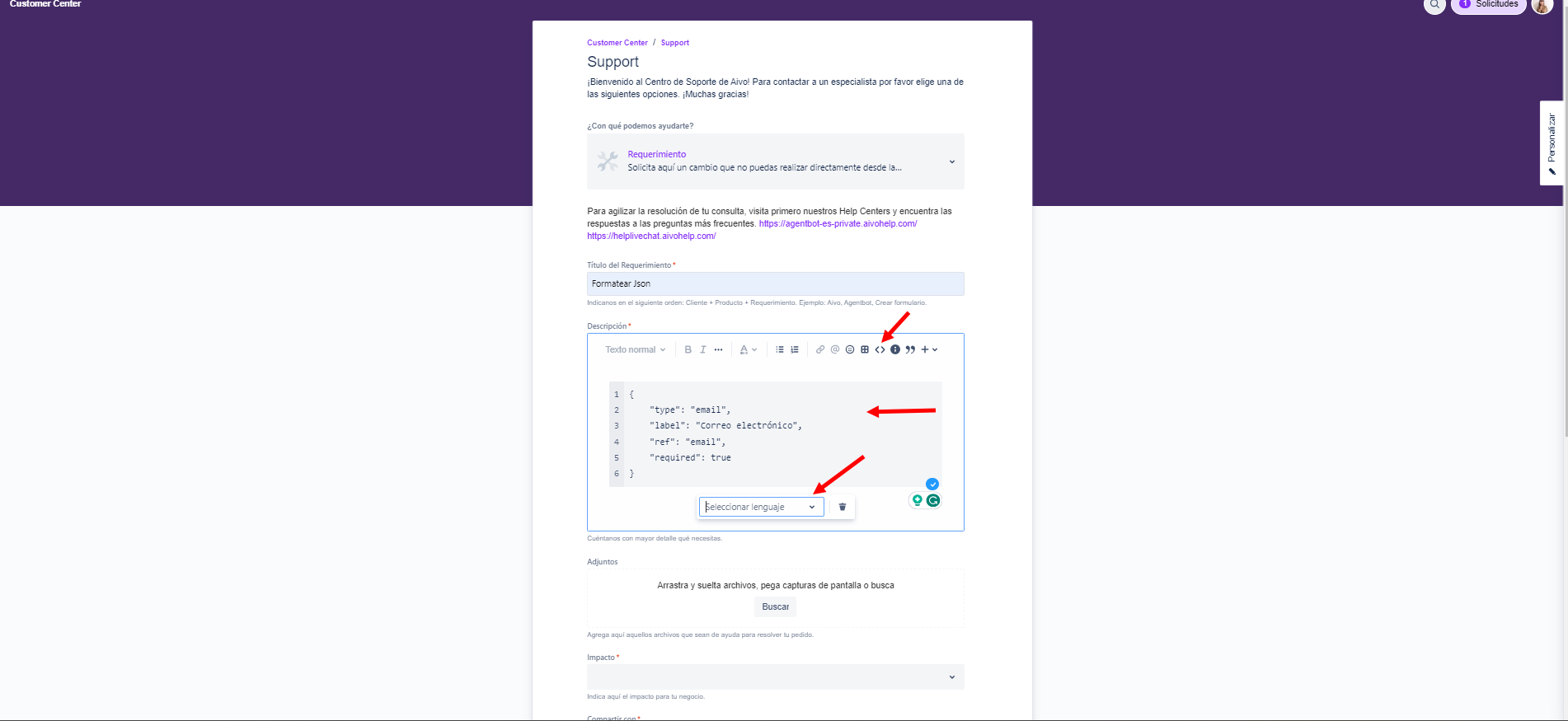
The following symbols will basically be what you need to format it  .
.
- {(opens JSON)
- } (closes JSON)
- {(separator)
- " " (the field name is enclosed in quotes).
- :
It may also help to have a JSON template .
- {
- "Custom field name 1": here you must say what type of field it is, and if necessary the size (string or text, email, number, textarea, checkbox),
- "Custom field name 2": here you should say what type of field it is, and if necessary the size (string or text, email, number, textarea, checkbox),
- "Custom field name 3": here you must say what type of field it is, and if necessary the size (string or text, email, number, textarea, checkbox)
- }
And with a practical example
- {
- "Address: string,
- "CUIT": number (size: 11),
- "General email": email
- }