To support the change introduced by WhatsApp, effective October 1, 2026, in which Meta will charge per message for replies sent within the 24-hour attention window, we are implementing simple but structural adjustments that will help reduce costs even further, in addition to the recommendations in the Guide to reducing WhatsApp costs without compromising the customer experience.
 Learn more about Meta's change at: How to Prepare for the WhatsApp Business Pricing Change
 Here, we present four scenarios that show a more specific optimization: the content does not disappear or change; it moves into the body, footer, or description of the interactive element to avoid a separate message.
 Scenarios analyzed
| Scenario |
Before |
After |
Message reduction for the case |
Estimated share of the invoice for the analyzed operation * | Implemented Solution ** |
| Response with a button element | 2 messages | 1 message | 50% | 14.8% | Place the response in the body of the buttons and leave the generic instruction as a footer. |
| Response with a list element | 2 messages | 1 message | 50% |
6.8% | Use the actual text of the response as the body of the list. |
| Response with line breaks — separate bubbles | 4 messages | 1 message | 75% | 5.5% | Review the settings that split the text into separate lines and, if necessary, submit a Service Request or contact your CSM to consolidate the responses into a single chat bubble. |
| Response with a PDF, video, or other attachment element | 2 messages | 1 message | 50% | 0.3% | Use the explanatory text as the file’s description or descriptive text. The same criteria apply to videos and other attachments. |
* The percentages in this column indicate the estimated share of each scenario in the bill for the analyzed procedure. They do not represent a universal savings per procedure and should not be directly compared with the per-case savings percentages in the cost guide.
** The principle is general: before sending text and an element separately, check whether the text can be included within the element itself.
 Important: Changes to buttons, lists, and attachments will be automatically applied to accounts that use WhatsApp as a channel. To combine responses separated by line breaks, you’ll need to submit a Service Request or contact your CSM. Important: Changes to buttons, lists, and attachments will be automatically applied to accounts that use WhatsApp as a channel. To combine responses separated by line breaks, you’ll need to submit a Service Request or contact your CSM.
|
| What changed? Visual examples of each case ⬇ |
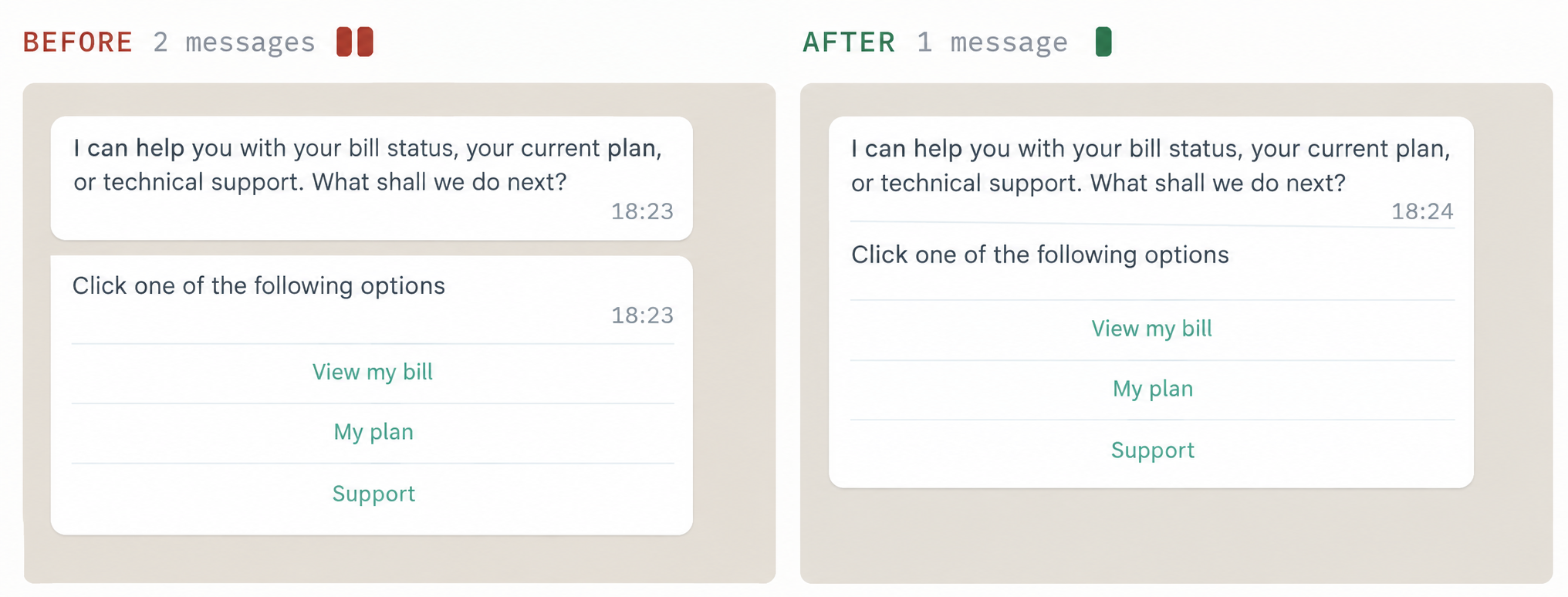
 Response with buttons in a single bubble
 Responses with buttons used to send the response text as a separate message from the menu.
 What changes? The text is integrated into the same button message, in a single send. The response text becomes the body of the button message. The configuration instruction moves to the footer in smaller text.
 Impact: In the analyzed scenario, the response went from two messages to one. This represents a 50% reduction in the number of messages for that case and an estimated 14.8% share of the invoice for the analyzed operation.
 Scope: Link buttons combined with reply buttons will be displayed as two separate messages due to WhatsApp's limitations.
 Response with a list in a single bubble
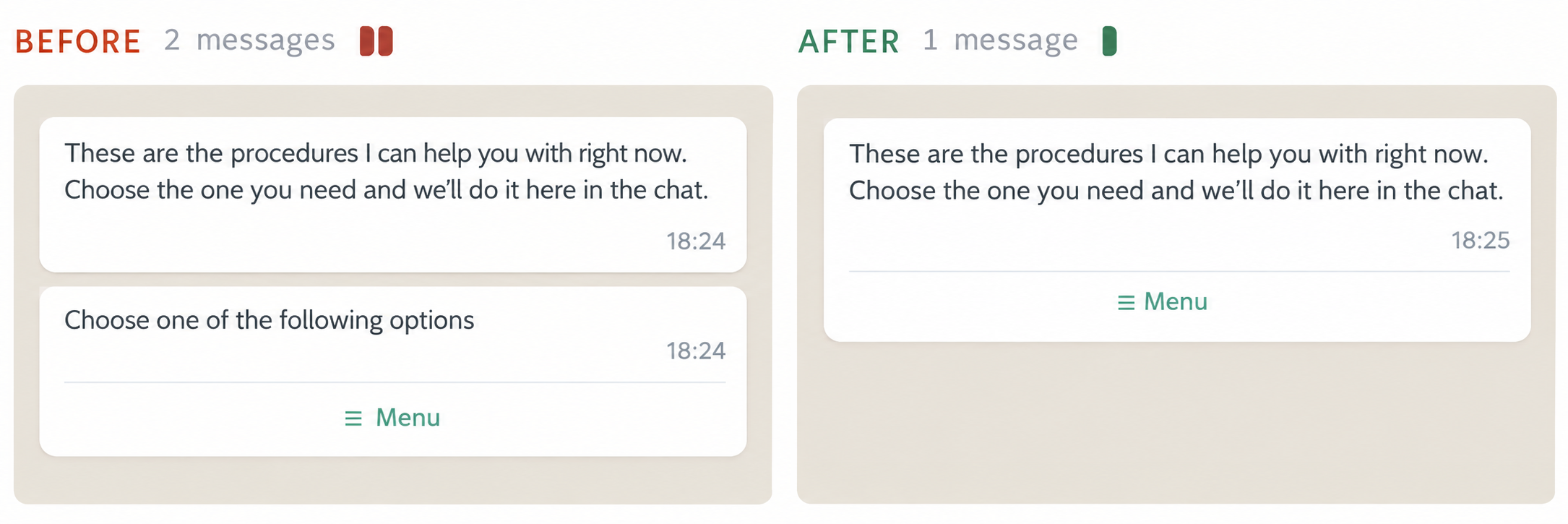
The same pattern occurred with responses containing a list of options.
What changes? For the user, the content and options remain the same: they are now displayed in a single bubble. The options in the list are identical.
Impact: In the analyzed scenario, the response went from two messages to one. This represents a 50% reduction in the number of messages for that case and an estimated 6.8% share of the invoice for the analyzed operation.
 Response with line breaks
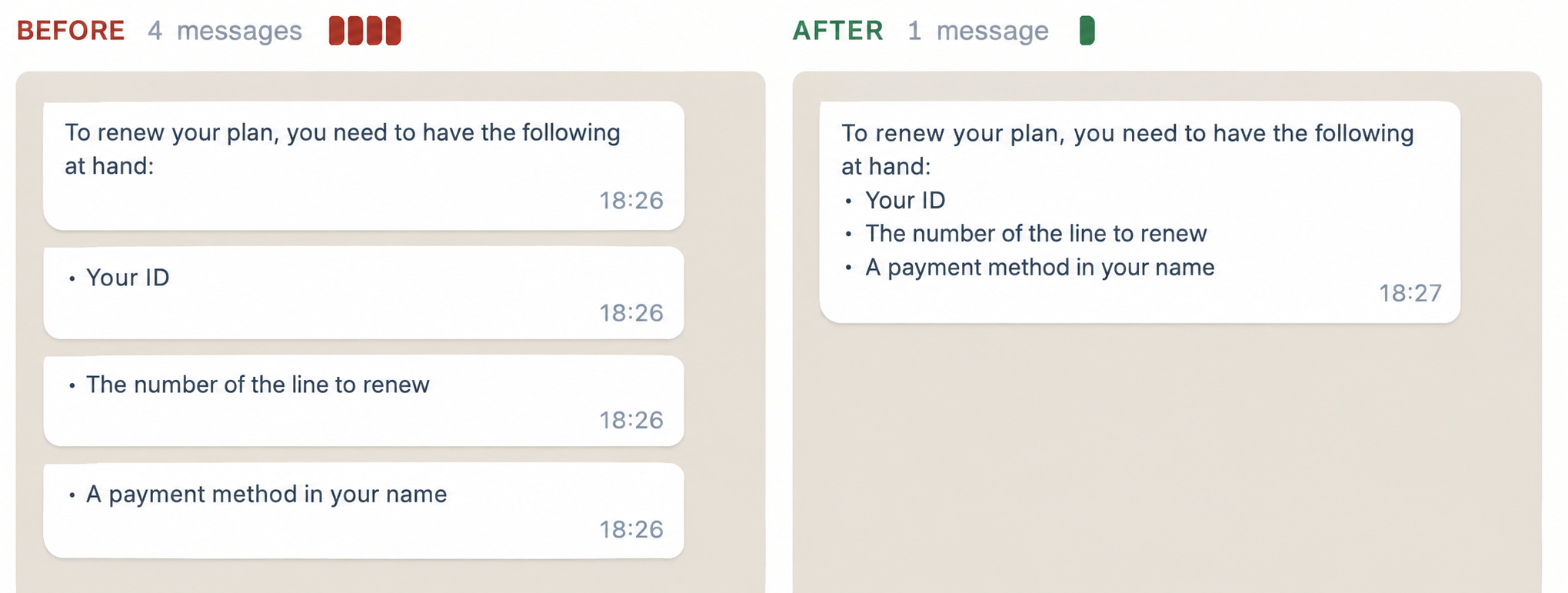
Some channels were configured to split a response into several bubbles for each line break found.
What changes? The conversation shifts from four short speech bubbles to a single, longer one. It's the most noticeable change of the four.
Impact: In the analyzed scenario, the response went from four messages to one. This represents a 75% reduction in the number of messages for that case and an estimated 5.5% share of the invoice for the analyzed operation.
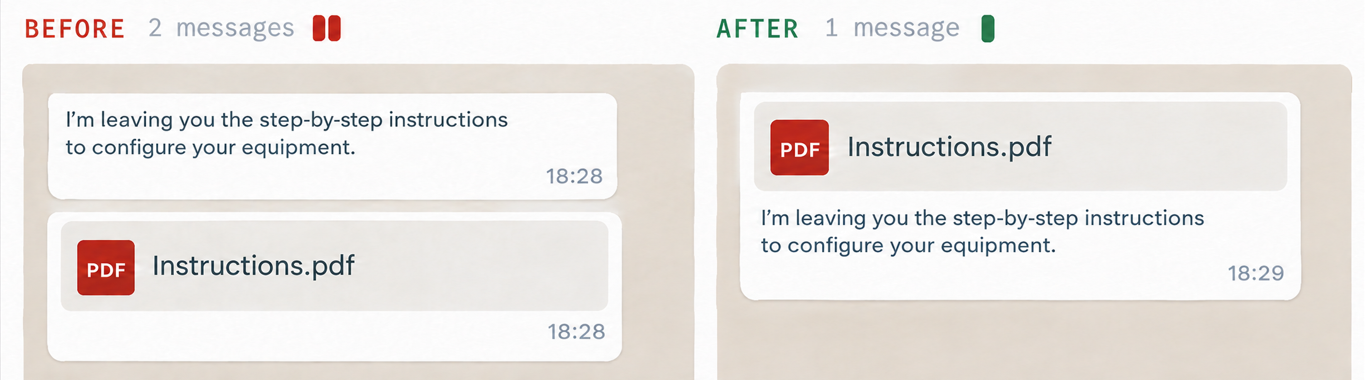
 Text and file in a single message:
Attachments were previously sent as a separate message from the descriptive text configured to accompany them.
What changes? The text is incorporated as the file caption or description. This is WhatsApp’s standard format for sending an attachment with an explanation. The same principle applies to videos and other files.
Impact: In the analyzed scenario, the file and its explanation went from two messages to one. This represents a 50% reduction in the number of messages for that case and an estimated 0.3% share of the invoice for the analyzed operation.