
 Release date: 06/30/2026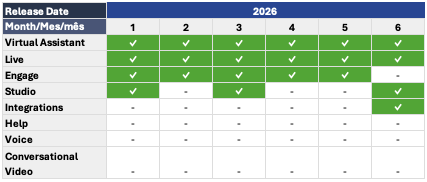
Below, you'll find the details of this month's active releases, along with links to the corresponding articles in our Help Center for more information:
LIVE
 Section(s): Users General > Users
✔ Transfer Limit per Agent: Supervisors and Supervisor Agents can now set a transfer limit per agent. This setting is available in the Users section when editing an agent's profile.
With this new feature, you can define the maximum number of transfers each agent can make within a 24-hour period. Its purpose is to prevent excessive or inappropriate use of transfers, helping protect your operation and improve the customer experience.
 Articles: Section(s): Users General > Roles and Permissions
✔ Two new granular permissions have been added to the Roles and Permissions feature in Live:
View Conversation History
This permission controls access to chat details. Users can access conversation details through four different paths:
- Reports → Chats
- Customers → View Profile
- Open Previous Conversation from an active chat
- The Previous Connections tab within the conversation details view
This permission controls whether a role can activate or deactivate users from Users → General → Users.
- If the role has this permission, the enable/disable toggle will be available.
- If the role does not have this permission, the toggle will be disabled.
Articles:STUDIO
Section(s): Nodes > Function✔ MS Excel Node: Located in the Function node category, the MS Excel node allows you to interact with Microsoft Excel workbooks stored on SharePoint sites or shared OneDrive drives.
With this node, you can read cell ranges, add rows to the end of a worksheet, update the contents of a cell range, and clear the contents of a cell range. This feature simplifies the integration of flows with Excel files, enabling you to automate data reading and updating tasks directly from Studio.
Articles:VIRTUAL ASSISTANT
Section(s): Settings > Channels > WhatsApp✔ WhatsApp Business User ID: WhatsApp Business will soon introduce usernames and the Business User ID feature.
This update will allow users to start conversations using a username instead of sharing their phone number, while also introducing the BSUID, a unique identifier generated by Meta for each user-business combination.
Key dates:
- June 29: Global username reservation.
- July 7: First country testing phase (initial pilot countries).
- July 20: Second country testing phase (Colombia, Peru, and the Dominican Republic).
- Early September: General availability (global rollout).
Articles:INTEGRATIONS
Section(s): Integrations > Overview✔ Connect Virtual Assistant with an External Service: We've added a reference document to our Help Center that outlines the basic requirements for developing a technical integration with Virtual Assistant.
This document applies to both web service integrations and third-party APIs, and includes an example of the recommended documentation format.
Articles: