
 Release Date: March 30, 2026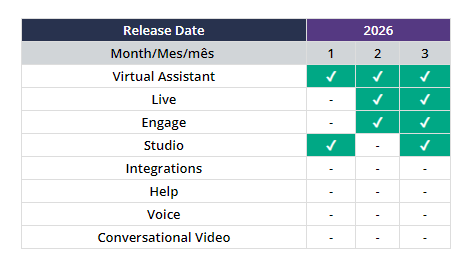
Below, we share a summary of each change, along with direct links to the explanatory articles in our Help Center.
--------------------------------------------------------------------------------------------------

 Section(s) Virtual Assistant: Knowledge / Settings / Analytics / Get started
✓ Publish content: A change has been made to the Publish button in the Knowledge section. After a successful publication, the button will be disabled and display a 5-minute countdown indicating how much time remains before it becomes active again. For example: “The button will be enabled again in 2:41.”
✓ Emojis in buttons: From now on, hex/dec code is no longer recognized for adding emojis to buttons uploaded in Virtual Assistant, whether from the add-on itself, in nested sections, or in the list add-on. There are 3 key ways to correctly include emojis in each button.
✓ VA Analytics — New training in English: the Virtual Assistant Analytics section now has its own learning space in English, featuring 13 tutorial videos covering each module (~47 minutes total), 15 additional reading resources, and a closing NPS survey.
✓ Documentation updates: Content updates have been completed, unifying and aligning explanations, processes, and formats: videos, tours with the option to listen to narration, GIFs, and updated screens.
 Articles:
- Publish content
- Knowledge section
- Add emojis to buttons
- Data driven decisions: master the Analytics section of Virtual Assistant
- Learn what intentions are and all the actions you can perform on them
- Import content to Virtual Assistant
- Add ways to ask
- Synonyms: key data and how to upload them
- Union of words, see how to create or separate them
- Form complement
- Integrations complement
- PDF complement
- Cobrowsing complement
- Assign feelings to the avatar based on the response
- Webview complement
- Iframe complement
- Test your virtual assistant's content
- SAML configuration and operation
- Access settings to create, edit, or delete channels
- Create and manage users in Virtual Assistant
- Learn what tags are for and how to manage them
- Difference between a session and an interaction
- Get to know the Chat module
- Data you can analyze in the Ads module
- Turn on your virtual assistant and improve customer service
- Best practices: testing phase
 Section(s) Live: Settings > Domains
✓ The list of domains required to use Live has been updated to include https://thoughtspot.cloud, which enables access for viewing and generating reports. These domains must be enabled on each client’s internal network if their network is protected or controlled.
Articles:--------------------------------------------------------------------------------------------------
 Section(s) Engage: Analytics > Dashboard / Interaction
Campaigns > Recurrent > View Details
✓ Time zone banner: An informational banner has been added indicating that the data is displayed according to the user’s local time zone, including details on the time difference and the detected region (e.g., UTC+1, Europe/Madrid). The banner can be closed, and once dismissed, it will not be displayed again.
✓ New training in English: the Engage Training is now available in the English Help, featuring 8 tutorial videos covering the platform's sections and 17 related resources to reinforce the content.
Articles:- Explore the Dashboard section in Engage Analytics
- Get to know the Engagement section in Engage Analytics
- Check the metrics for your Recurrent Campaigns
- Get started with Engage

✓ In our Changelog Studio Public document, you can see all the technical changes to take into account on this platform.
Section(s) Studio: Nodes✓ PDF Node: The Title field has been added to the PDF Node’s configuration properties, allowing you to set the PDF title that will be displayed to users during the conversation.
Articles:--------------------------------------------------------------------------------------------------
 In the following video, you'll see this month's news flash, a quick look at the improvements and updates to our platforms.