 Release Date: 10/31/2026
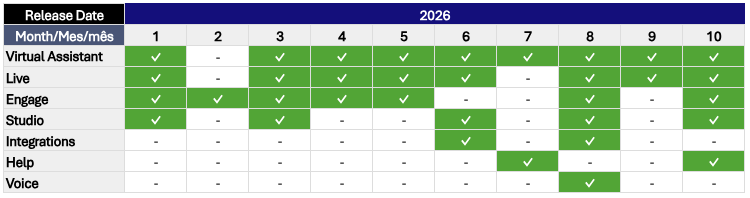
Below, you’ll find details about this month’s active releases, along with links to the corresponding articles in our Help Center for more information:

 Section(s): Analytics > GenAI
GenAI Analytics Dashboard (15/10): Now available for Virtual Assistants using the New Conversational Engine. It includes three tabs: Bot Performance, GenAI Knowledge, and Conversations, providing insights into interaction volume and paths, response performance, knowledge base usage, and conversations.
 Article(s): Section(s): Knowledge > Custom > Buttons Add-on
Intention ID in the Intention Trigger Button (14/10): You can now enter an intention’s text or ID in the corresponding field. The match must be exact. As you type, you can select matching results from the Custom Knowledge Base. This feature is only available with the New Conversational Engine.
Article(s):- Add the Intention Trigger Button Type
- Use the Buttons Add-on
- Button Types You Can Implement in Responses
- Differences Between Message and Intention Trigger Button Types
Section(s): Channels > WebInactivity-Based Satisfaction Survey on the Web Channel (08/10): You can now automatically trigger a satisfaction survey when a user stops responding for the time configured on the Web channel. This feature is limited to Web channel conversations and requires a service request to be enabled.
Article(s):- Trigger a Satisfaction Survey After a Period of Inactivity on the Web Channel
- Key Requirements for Enabling the Satisfaction Survey
Section(s): Channel XChannel X, formerly Twitter (21/10): X discontinued support for the API previously used, and its new API is not compatible with the current implementation. As a result, this channel is no longer operational or available on the platform, nor can it be enabled through a Support request.
 Section(s): Chat
File Attachments (09/10): Agents and users can now send and receive files up to 100 MB in a conversation, increased from the previous 5 MB limit. Supported formats include images (.jpg, .jpeg, .png), PDF, Word (.docx, .doc), Excel (.xls, .xlsx), video (.mp4, .mpeg4, .avi), and audio (.mp3). You can also drag and drop files or copy and paste them into the chat.
Article(s): Section(s): Users > Edit ProfileConcurrent Conversation Settings (30/10): The configuration field is now hidden for the Administrator role because this role does not handle conversations, so the setting does not apply to its users.
Article(s): Section(s): Campaigns > One Time
Audience CSV File Size Limit (30/10): The size limit for audience CSV files used in One Time campaigns has increased from 10 MB to 30 MB on WhatsApp and SMS channels.
Article(s):- One Time Message Campaigns on the WhatsApp Channel
- One Time Message Campaigns on the SMS Channel
- Key Information if Errors Are Found in Your Audience CSV for One Time Campaigns
Section(s): Templates > WhatsAppIntention ID in Quick Reply Buttons (16/10): You can now use an intention ID instead of text in WhatsApp template quick reply buttons to ensure an exact match.
Article(s): Section(s): Nodes > Messaging
Carousel Node (27/10): Now available in Studio, this node allows you to respond with a carousel containing one or more slides, which can include images and buttons. Buttons can trigger an intention or redirect users to a link. You can configure automatic slide transitions or disable them.
Article(s): Section(s): Help Center > Live
Updated Live Articles (20/10): A comprehensive content update has been completed in the Help Center. Improvements include interface changes, process updates, and new content formats such as videos on landing pages, voice-over stories, GIFs, and redesigned screens. The updated sections include Get Started, Profile, Chat, Reports, Groups, Users, and Settings.
Article(s): In the following video, you’ll find a summary of this month’s updates and a quick overview of the main improvements to our platforms: