
 Release Date: July 30, 2026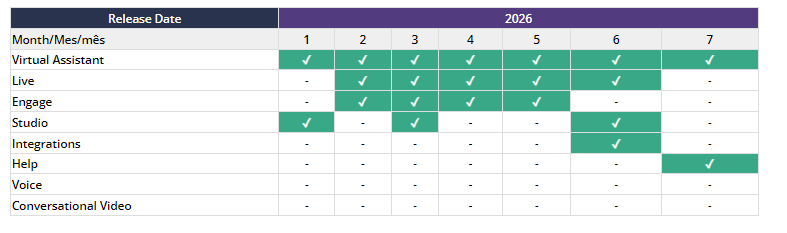
Below, we share a summary of each change, along with direct links to the explanatory articles in our Help Center:
--------------------------------------------------------------------------------------------------

 Section(s) Virtual Assistant: Knowledge >Personalized & Autogenerated
Settings > Channels
✓ Step-by-Step Guide to Creating a Username on Meta: This information is provided to help you if you have an active WhatsApp channel and need to know where and how to manage this feature, given WhatsApp’s upcoming update that will allow users to start conversations using a username instead of sharing their phone number and will incorporate the BSUID, a unique identifier generated by Meta for each user-business pairing.
✓ The arrow for publishing content is once again available in the intention management panel:
• In addition, the timer that had been added some time ago to the “Publish” button in the “Personalized Knowledge” section of the Virtual Assistant has been removed.
• Both the “Publish” button in the Personalized Knowledge section and the arrow in the intention panel will remain disabled until the process is complete.
• All the content will be published at once with both options. In other words, the publication affects all the bot’s content, not just the edited intention.
✓ Autogenerated Knowledge, a new resource, is now available to provide a deeper understanding of how this capability works, the role of prompts, and which aspects can be customized to achieve better results.
✓ In the same way, the guide on Best Practices for Managing Autogenerated Knowledge with Generative AI was updated to include new recommendations, clarifications, and criteria to facilitate its implementation.
 Articles:
- How to create a username in WhatsApp
- Publishing Content
- Knowledge Section
- Autogenerated Knowledge Functionality and the Use of Prompts
- Best Practices for Managing Your Knowledge Autogenerated by Generative AI

 Reminder: In the “Get started here - Video tutorials” section of our Help Center, you'll find the official on-demand training hub with training materials available on Virtual Assistant, Live y Engage. Articles:
Virtual Assistant
1. Get started with Virtual Assistant
2. Data-driven decisions: master the Analytics section of Virtual Assistant
3. Manage your content from the Knowledge section
4. Train your virtual assistant: find ways to improve responses
Live
1. Get started with Live: Training for Agents
2. Get Started with Live: Training for Coordinators, Agent Supervisors, Supervisors, and Administrators
Engage
1. Get started with Engage
--------------------------------------------------------------------------------------------------
 In the following video, you'll see this month's news flash, a quick look at the improvements and updates to our platforms.