If you have implemented asynchronous channels in your customer service model, such as WhatsApp, Instagram or Facebook, you can make transfers to Live and, in turn, determine that in the time ranges where the agents are not online, the user is given the option to enter a waiting line to be served when the advisors are available again, or otherwise continue talking to the virtual assistant.
From the derivation rules within the My Aivo platform, you will enable the asynchronous mode to be executed.
Key data:
Review here the usual process for a transfer to take place. |
Then, if a user needs to be referred to an advisor after hours, the bot will inform him/her in a standard automatic message and will simultaneously ask if he/she wishes to wait until an agent is available again.
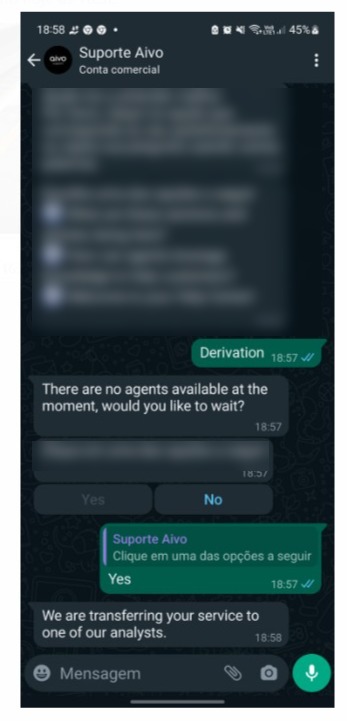
If YES is selected as the answer,
- The attention message configured in the transferred section of this specific referral, within My Aivo, will be displayed.
- In the internal process of the My Aivo platform, the conversation with the virtual assistant will be closed for transfer to Live.
- The conversation is marked as transferred.
- The user is put on hold until an agent connects to the Live platform, i.e. the conversation will never be forced to close.
- If you have set up a direct referral, the user will not be able to continue conversing with the virtual assistant once the conversation is transferred.
- In case you do not have a direct referral, if the user wishes, while waiting, he/she can continue chatting with the Virtual Assistant. If this happens, in the Chat Report of My Aivo Platform, two different chat sessions will be recorded:
- A session records the initial conversation, prior to accepting to wait to be attended by the agent, which will have as a resolution "Transferred" for whatever reason.
- In the second session is the conversation with the virtual assistant while waiting for the referral. If in the second session with the virtual assistant, another referral is generated, the user will be shown the referral message. But in Live, as it was already transferred the first time and is still waiting, the transfer is not generated again.
Waiting duration: according to WhatsApp policy, there is a maximum limit of 24 hours, which is the time that WhatsApp allows a session to have no interactions. In other words, the session in pending status is closed after 24 hours of inactivity, either by the user or the agent.
The customer will be informed when the agent is available.
In Live, the agent will see the conversations received on hold, in the same way as the others, through the chat on the left side of the screen.
If you choose NOT to wait, the customer continues to chat with the virtual assistant, and the conversation is not considered transferred or terminated.