The types of buttons you can implement in a response are:
 Message: enables you to associate the button with an intention previously loaded in your platform content.
When configuring it, you must write in the "Intention to which it responds" field the text of the intention as it is written in your knowledge base. In this way, when the user presses the button, they will receive the response you have created for that intention, depending on the channel where they are chatting. That is, if you have only configured the response with the button in one channel, for example, Web, and the user is chatting in another, for example, WhatsApp, it will not work. In the article Create multiple responses for an intention, you can read more about this topic.
 Link: The following alternatives make it possible to enter a URL so that when the user clicks the button, they are redirected. This improves the experience since it avoids the inclusion of long or unclear URLs in the message. You can select whether the link opens in the same window or a new one.
- Same Window: allows the URL to open in the same browser tab where the conversation window is located.
- New Window: allows you to add a URL that opens in a new tab of the browser that the user is using.
|
 Intent Trigger: Allows you to directly activate a specific intention of the virtual assistant using a button. This type of button is available only for the new conversational engine. To implement it, in the Buttons complement of your response, configure the following:
• In the Button Text field, enter the text that the user will see when they view the button.
• Under Button Type, select: Intent Trigger.
• And finally, under “Target Intent”: Enter the intent that will be displayed to your user when they click this button. The intent text must be entered exactly as it appears in your Personalized Knowledge Base for it to work correctly.
 This behavior is equivalent to that of the "Next Step" button that already existed in Studio. This behavior is equivalent to that of the "Next Step" button that already existed in Studio. |
 Here are some key details about using buttons on Facebook and WhatsApp:
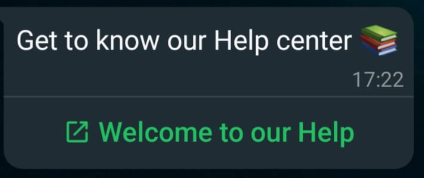
● WhatsApp: to use the buttons with a link complement, you must add only one button and not multiple buttons in the same response. In turn, you must always include a descriptive or informative text in the body of the message, which accompanies the button. See the example below:
● Facebook Messenger: the number of buttons to configure is unlimited; however, in this case, it is recommended to use up to three as a maximum. Please also note that if you use the Buttons complement with a link, it is suggested that you select the New Window option, due to limitations specific to this channel.
 You might be interested in...