
 Release Date: 04/30/2026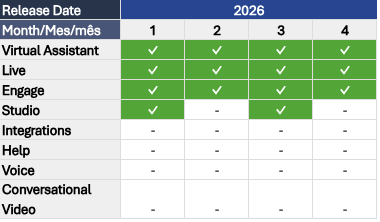
Below, you’ll find the details of this month’s active releases and links to the articles in our Help Center for more information:
 VIRTUAL ASSISTANT
 Section(s): Add-ons > Integrations
✔ Upload Stickers to WhatsApp: This feature allows you to respond to your customers using stickers in the WhatsApp channel.
Please note that its implementation is carried out through an integration in Studio. If your instance is not yet enabled, you can request it from your CSM after verifying your plan conditions.
 Articles: Section(s): Knowledge > Add-ons > Buttons
✔ Modify button order within the complement: you can now easily reorganize buttons within the complement.
Previously, changing their order required deleting and recreating them in the desired sequence. Now, you can reorder them by dragging and dropping them into your preferred position within the same group.
Articles: Section(s):- Knowledge > Add-ons > Image / Carousel / MP4 Video
- Settings > Channels > Web > Basic
✔ Accessibility: Virtual Assistant now includes improvements aligned with WCAG guidelines, aimed at creating a more inclusive experience.
This includes keyboard navigation with logical tab order across all interactive elements, as well as audio feedback in messages indicating sender, sent status, and received status.
Additionally, semantic HTML was integrated to properly describe buttons, lists, and links; alternative text support was added to image and carousel add-ons; and optional description fields were incorporated into videos, making them easier to interpret through assistive technologies.
Articles:- Accessibility features in Virtual Assistant
- Create and configure a WEB channel
- Add an MP4 video file as a complement to your responses
- Step by step guide to adding the Image complement
- Guide to using the Insert Image feature in the text editor in Virtual Assistant
- Differences between Insert Image and the Image complement
- Use the image carousel in your responses
LIVE Section(s): Monitor > Pause Requests✔ Pause Requests Monitor: This new monitor, available for users with the Supervisor and Supervisor Agent roles, allows management of agents’ pause and pre-pause requests, improving operational control and SLA compliance.
Articles: Section(s): Users General > Roles and Permissions✔ Role and permission management: This feature, available through a Service Request and exclusive to users with the Administrator role, allows the creation and configuration of custom roles.
With it, you can separate access to monitoring and reports, grant visibility only where necessary, restrict the editing of critical configurations to prevent unauthorized changes, and enable read-only access in sensitive modules.
Articles: Section(s): Reports > Pauses✔ Filter by agent: the report now includes a filter by agent name, allowing you to focus the analysis on a specific agent’s behavior and better understand their pause requests and status changes during the service shift.
Articles: ENGAGE Section(s):- Analytics > Dashboard > Generate Report
- Analytics > Interaction > Download table data / Download campaign reports
- Campaigns > One Time / Recurrent > Generate Report
✔ Report downloads: from now on, reports are generated and downloaded according to the browser’s local time zone. This ensures that data reflects the user’s local time instead of UTC time.
Articles: