This functionality allows authorized users within the same Live instance to start 1:1 conversations in real time and communicate with each other through text messages directly from the platform.
Internal Chat works independently from customer support conversations, so users can communicate with each other while continuing to assist customers.
 To enable the functionality, you must have a user with an Administrator profile.
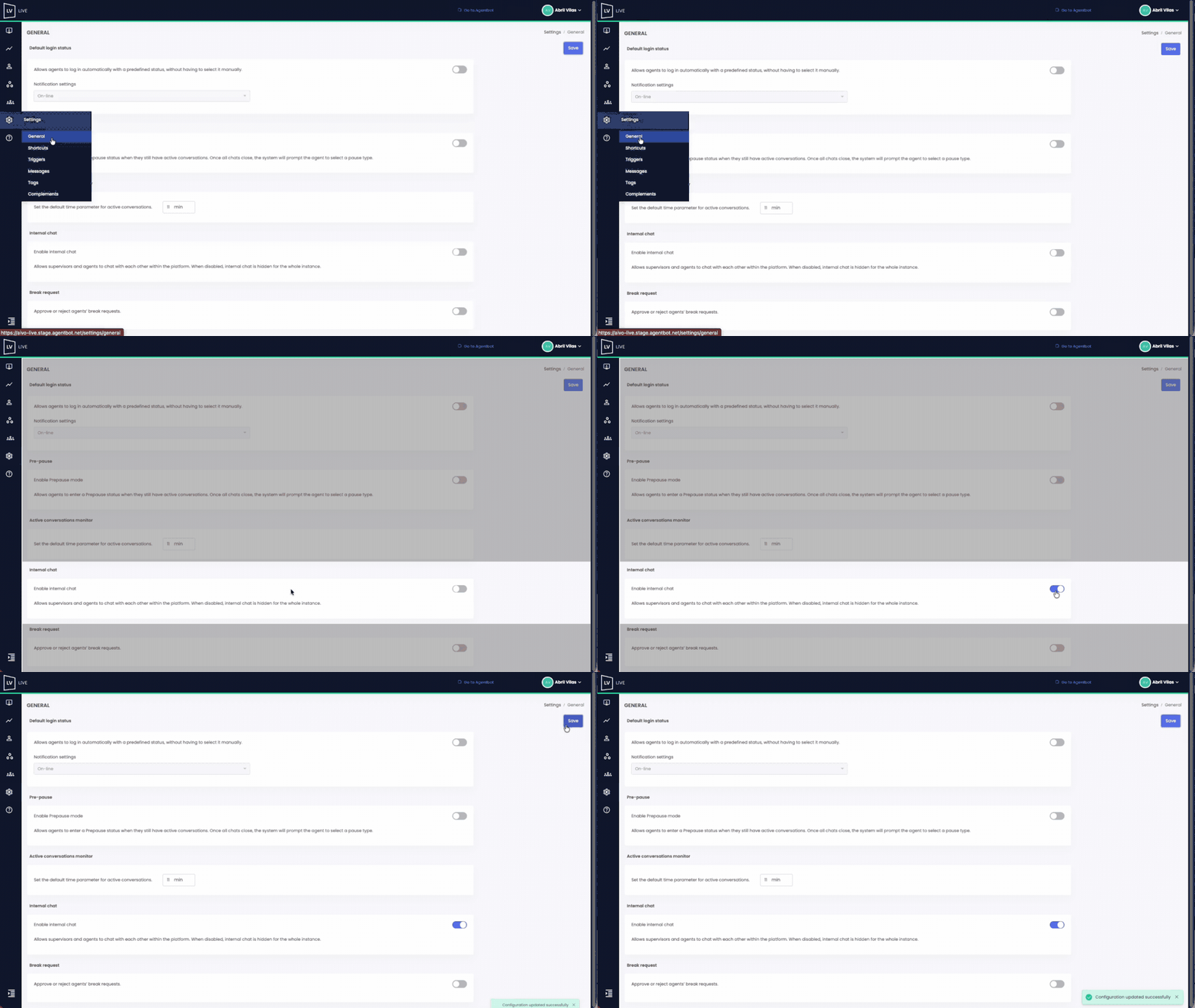
- Go to Live.
- Navigate to Settings → General.
- Enable the Internal Chat switch.
 When you enable this switch, the functionality will become available for individual configuration from the instance's Users section.
 Key Information:
- Enabling the general switch does not automatically enable Internal Chat for all users. Each user must also have their individual Internal Chat switch enabled.
- If the general switch is disabled, Internal Chat will not be available to any user in the instance, even if their individual switch was previously enabled. Additionally, the Internal Chat switch will no longer be displayed in the user's profile.
- This option is disabled by default for both new and existing users.
 Considerations According to the Permissions Model
✓ Traditional Live Permissions Model: Access to Internal Chat is available to Agent and Supervisor profiles. The Administrator can manage the general and individual Internal Chat settings but does not have access to the Internal Chat widget.
✓ Roles and Permissions Model: Access depends on the "View Internal Chat Widget" permission, which can be assigned to roles from the Roles and Permissions module.
Watch the example below to see the complete setup process: