 Release date: 08/31/2026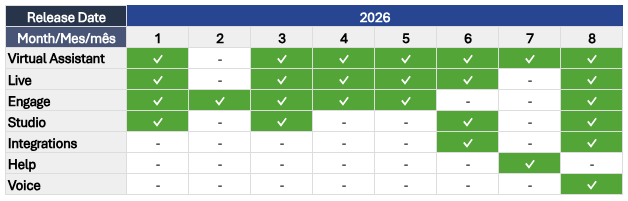
Below, you'll find the details of this month's active releases, along with links to the corresponding articles in our Help Center for more information:
 VIRTUAL ASSISTANT
 Section(s): Knowledge > Autogenerated
- New Search Mode in Autogenerated Knowledge (08/28): You can now choose whether to search only the URL entered or the entered URL together with all related links found during the process. To search only the entered URL, select the “Search only this URL” checkbox and click “Search Links”.
- Change History in the Autogenerated Section (08/26): A new change history logs activations, deactivations, searches, process executions, deletions, and new datasets, sorted by modification date. This provides greater visibility into knowledge changes and supports audit and investigation workflows.
- Preview and Download Extracted Text (08/20): You can preview and download the knowledge extracted through the scraping process. This helps validate source content, diagnose incorporated-content issues, and manage automatically generated knowledge with greater autonomy.
- Bulk Deletion in Autogenerated Knowledge (08/24): Records found after searching or processing links and locally uploaded or linked PDF files can now be deleted individually or in bulk.
- Enable Generative AI Autogenerated Knowledge (08/31): The Autogenerated Knowledge section now allows you to incorporate content from web pages and PDF documents through a scraping process to enhance your Custom Knowledge base.
- Incorporate PDF Content with Gen AI (08/31): In addition to extracting information from links on your website, you can now incorporate PDF documents. This allows the content of these documents to be integrated into the content base used by your Virtual Assistant, improving its ability to provide accurate responses to your customers’ queries.
 Article(s):
- Search Mode in Autogenerated Knowledge
- Change History in the Autogenerated Section
- Preview Extracted Text in the Autogenerated Knowledge Base
- Download Content Extracted by Autogenerated Knowledge
- Delete Records Found in the Autogenerated Knowledge Section
- Enable Autogenerated knowledge by Generative AI
- Incorporate the content of PDF files into auto-generated knowledge with Gen AI
Section(s): Knowledge > Complements > PDF- Increased PDF Document Size Limit (08/25): The maximum PDF size increased from 5 MB to 100 MB when configuring PDF complements and uploading files directly from a device.
Article(s): Section(s): Knowledge > Complements > Buttons- Intent Trigger Button (08/21): A new button type can trigger a specific intent directly in Virtual Assistant, giving teams greater control over the response delivered when a user selects a button. This feature is available only with the new conversational engine.
Article(s):- Add the Intent Trigger Button Type
- Use the Buttons Complement
- Types of Buttons That Can Be Implemented in Responses
- Differences Between the Message Button and the Intent Trigger Button
Section(s): New Conversational Engine- Virtual Assistant New Engine Video (08/06): A video covering the new engine’s key improvements, best practices, and guidance for addressing common content issues was incorporated into our Help Center.
Article(s): LIVE Section(s): Settings > General > Internal Chat-
Internal Chat (08/28): Authorized users within the same Live instance can start real-time 1:1 text conversations directly in the platform. Internal Chat works independently from customer-support conversations and does not consume the concurrent conversation capacity assigned to the agent.
- Access is configured at two levels: an administrator must enable Internal Chat for the instance under Settings > General, and the feature must then be enabled individually for each user.
Article(s):- Internal Chat in Live
- Enable Internal Chat in Your Live Instance
- Manage the Live Users Section
- Default Roles in Live
- Manage Roles and Permissions in Live
Section(s): Message Sending- Proactive Messaging (08/31): We have completely updated the materials for the proactive messaging process and its configuration in Live.
Article(s): Section(s): Reports > Dashboard- New time metric (08/03): The new “Average Attention Time” metric has been added to the Live Dashboard. This metric shows the average effective handling time for closed conversations, calculated from the moment the conversation is assigned to an Agent until it is completed.
Article(s): ENGAGE Section(s): Campaigns > One time and Recurring- Message Sending via Business ID (08/31): Engage now allows messages to be sent using a Business-Scoped User ID (BSUID) in regions where this functionality is available. Messages can be sent using either a phone number or a BSUID. Usernames are not currently supported.
Article(s):- One-time Message Campaigns in the WhatsApp Channel
- Create Recurring Campaigns for the WhatsApp Channel
STUDIO Section(s): Studio Update-
The Studio Update entered QA on 08/20, allowing customers with access to a QA environment to test the changes before production rollout.
- The Next Step selector now uses a search autocomplete field instead of the integrations drop-down, making it easier to find and select the desired Step In node.
- Step In node IDs now accept only letters, numbers, periods (.), underscores (_), and hyphens (-). No action is required unless IDs are manually edited during flow imports.
- Phase 1 - September 8
- Phase 2 - September 22
- Phase 3 - October 6
- Phase 4 - October 20
Article(s): INTEGRATIONS Section(s): Messaging API- New Support Materials for the Messaging API (08/27): Two new resources cover FAQs and best practices, plus error mapping and technical considerations. The materials are intended to make information easier to find and provide greater clarity for teams working with the API.
Article(s):- FAQs and Best Practices for the Messaging API
- Error Mapping and Technical Considerations for the Messaging API
VOICE Section(s): Voice Help Center- Updated Voice Articles (08/14): Voice articles were updated with information about Voice features and capabilities, call transfers to human agents, the Voice Analytics Dashboard, and Voice integrations. The updated material is available in all three languages.
Article(s):