
 Release Date 11/30/2025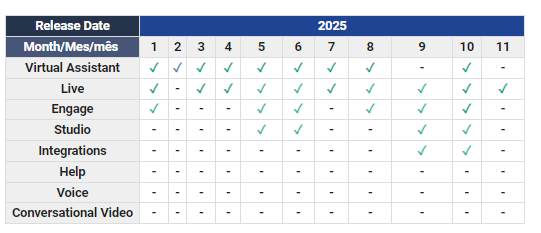
Below, we share a summary of each change, along with direct links to the explanatory articles in our Help Center:
 Live
Live Section(s):
✓ Reports > Dashboard / Agents/ Chat/ Breaks/ Video calls / Tags
- In all modules of the Reports section, within the date filters: from and to, it is now also possible to select the exact start and end time of the search, in hours, minutes, and seconds.
- In the Dashboard, in addition to the new date filter, the percentage corresponding to the total achieved in relation to the average target has been added to the Average SLA card.
- The visual interface has been updated in the Video Call and Tags Reports. From a UX perspective, we have unified the format with the rest of the section, incorporating a title and standardizing criteria in the filter descriptions with more intuitive concepts.
In addition, we have added information about features within each article.
 Articles:
- Learn all about the Live Dashboard
- Data I can analyze in the chat module of lives reports section
- View the Logs of a Live conversation
- Data you can analyze in the Agents report
- Download the Pause report
- Video call performance in Live
- Learn about Live's Tag Report
 In the following video, you'll see this month's news flash, a quick look at the improvements and updates to our platforms.